What’s new
Browse below to learn about the features we’ve added to Lumio.
If you have an idea for a feature, send us a request.
Release date: | August 2026 |
Summary | Lumio now has a collapsible left navigation. Teachers can also monitor students' Handout activities with live thumbnails. To help teachers start fresh for the new school year, Class Sessions now hides older sessions under an Older Sessions section automatically. Importing files is also easier, with support for multiple files at once, simplified import options, and a single toggle for editable content. |
Expand the sections below to learn more about what’s new in this latest Lumio release.
Lumio Beta
Left navigation: Lumio now has a left navigation sidebar. Expand it for full menu labels, or collapse it to save screen space.
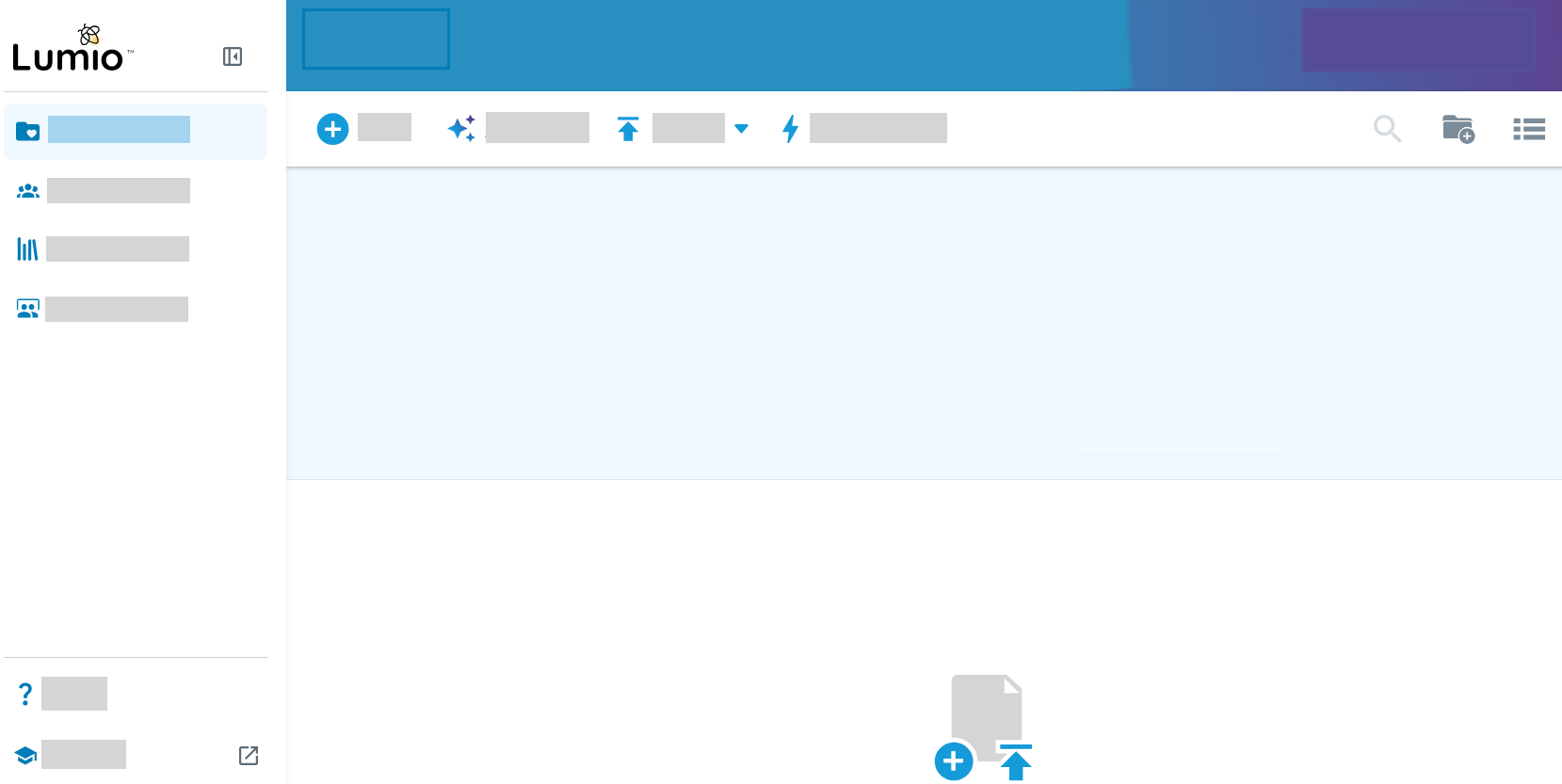
SeeLeft navigation
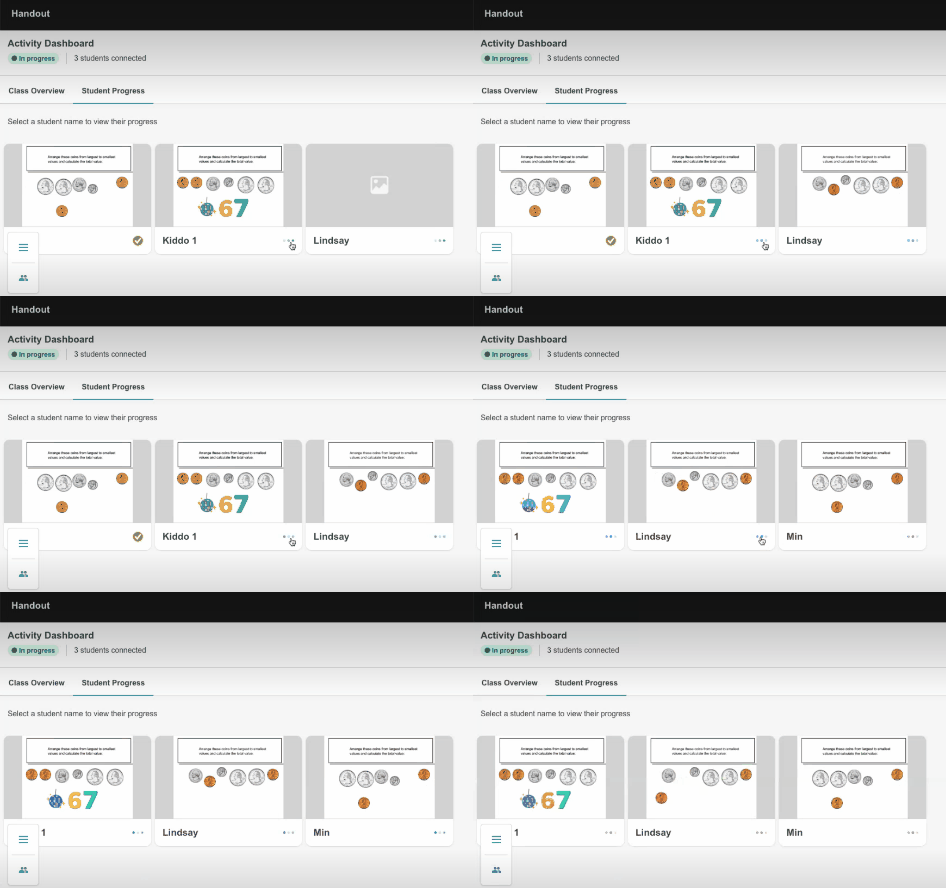
Handout Dashboard live thumbnails
The Handout activity dashboard now shows thumbnails of student work so you can see what everyone's doing at a glance.
Note
Thumbnails appear blank after session expires (~24 hours). No data is lost and you an click the thumbnail as a workaround.
Older Sessions section added to the Class Session tab
Class Sessions now automatically moves sessions older than 30 days into a collapsed Older Sessions section, keeping your most recent activity front and center. This is especially helpful at the start of a new school year, when teachers want a fresh view of their class sessions.

Importing resources
Import multiple files at once: Select several files to import at the same time. Lumio processes each file separately, and you can keep working while they import. Track the import progress in the Processing panel in the bottom-right corner.
Simplified import options: The Import a file dialog box now has three choices:
Import from your device
Import from Google Drive
Reuse a Lumio lesson
Note
The Import from Google Drive option is only available when you're signed in to Lumio with a Google account. If you're signed in with a Microsoft account, you won't see this option.
- Make it editable: You can now make PDF, PowerPoint, Google Slides, and Google Docs imports into editable text, images, and objects when you turn on this toggle.
Release date: | July 2026 |
Summary | AI Assist Activity generation is now out of Lumio Beta and available to all users. AI Assist analyzes your lesson and suggests activities at the right moments, so you can add them with one click. |
Expand the sections below to learn more about what’s new in this latest Lumio release.
Enhancing lessons with Lumio AI Assist
Highlights
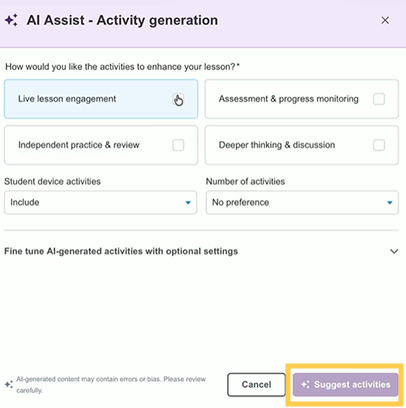
AI Assist Activity generation: Teachers can now use AI to automatically generate interactive Lumio activities directly within their lessons.
AI Assist analyzes lesson content and suggests activities at the right instructional moments, covering a range of types including quizzes, polls, games, and more.
Release date: | June 2026 |
Summary | In Lumio Beta, use AI Assist to automatically generate interactive activities—including quizzes, polls, and games—directly within your Lumio lessons to enhance them. Teachers can now import resources directly into sessions. |
Expand the sections below to learn more about what’s new in this latest Lumio release.
Whiteboard
Highlights
Delivery mode UI refresh: Now available to all users, Lumio introduces a more modern, streamlined interface for lesson delivery, with improved usability, accessibility, and visual layout—making lessons easier to navigate and present without changing core lesson functionality.
Class Sessions
Highlights
Importing resources: Teachers can now import pages and activities from any file in My Library or Shared Libraries directly into a session. No need to recreate them from scratch. Just open a session in Edit mode, pull in what you need from existing files, and keep going.
Lumio Beta
Highlights
AI Assist Activity generation: Teachers can now use AI to automatically generate interactive Lumio activities directly within their lessons. AI Assist analyzes lesson content and suggests activities at the right instructional moments, covering a range of types including quizzes, polls, games, and more.
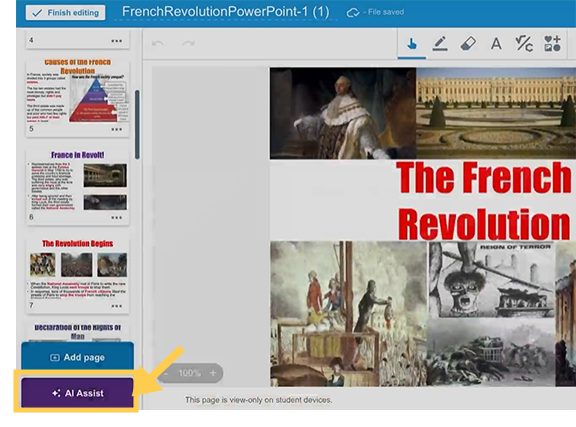
 Previous release notes
Release date: | May 2026 |
Summary | This release brings a refreshed student interface, expanded screen reader support for whiteboard activities, and safer image search results. Teachers can now see live thumbnail previews of student handout submissions at a glance, with automatic sorting by completion status. New classroom management tools are available directly from the Manage class menu (formerly Edit class). |
Whiteboard
Highlights
Student UI refresh: The student sign-in page and delivery mode have a refreshed look with lighter colors, creating a cleaner, more welcoming experience for students.
Improved accessibility for screen readers: Students using screen readers or keyboard-only navigation can now enter edit mode on editable text annotations in Handout, Whole-class Whiteboard, and Group Workspace activities, allowing them to participate in whiteboard activities on equal footing with their peers.
Improved image search safety: Image search now filters inappropriate content more effectively while still returning safe, usable results for common search terms, making it easier to find appropriate images for lessons.
Lumio Beta
Highlights
Handout Dashboard: Live thumbnails: The Handout Dashboard now displays thumbnail previews of student work, giving teachers a quick visual overview of class progress without opening each submission individually.
Note
Thumbnails appear blank after session expires (~24 hours). No data is lost and you an click the thumbnail as a workaround.
Manage class: The Edit class button is now Manage class, giving teachers access to both class settings and new classroom management tools in one place. A Beta tag indicates features actively in development. Two new features include:
Noise monitor: Monitor classroom volume levels at a glance directly from the Manage class menu. Teachers can set a goal timer, adjust microphone sensitivity, customize loudness thresholds, and hide the character for older students.
Widget wall: Launch a collection of classroom management widgets any time during the day, without opening a lesson. The Widget Wall includes timers, traffic lights, dice, a random name picker, attendance tracking, and a built-in noise meter.
Release date: | March 18, 2026 |
Summary | The Lumio Beta channel introduces a more modern, streamlined interface for lesson delivery. |
Lumio Beta
Highlights
Delivery mode UI refresh: Lumio introduces a more modern, streamlined interface for lesson delivery, with improved usability, accessibility, and visual layout—making lessons easier to navigate and present without changing core lesson functionality.
Release date: | February 23, 2026 |
Summary | Instant start is now available in Lumio Beta, and Export Handout as PDF is now available for all users! |
Handout
Highlights
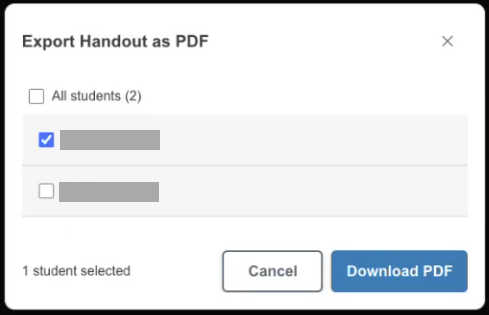
All users can now export handouts as PDFs and select which student handouts they want to export.
Lumio Beta
Highlights
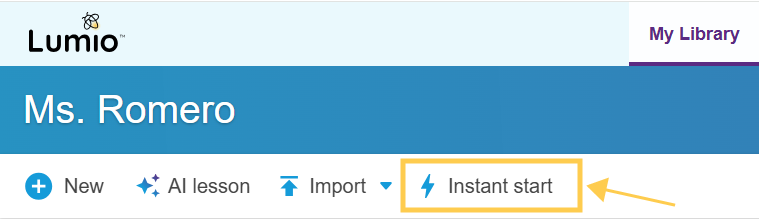
Instant start: Teachers can quickly launch a session with a ready-made activity, or open a whiteboard to model, solve, or brainstorm with students.
SeeInstant start
Release date: | February 9, 2026 |
Summary | Lumio whiteboard now supports keyboard navigation and screen readers! Teachers can also select individual student handouts to export. |
Whiteboard
Highlights
Lumio whiteboard now supports keyboard navigation.
Lumio lessons are compatible with screen readers.
Teachers can now better design lessons with alt text features.
Lumio Beta
Highlights
Export Handout as PDF: Teachers can now select which student handouts they want to export.
Release date: | January 13, 2026 |
Summary | Lumio AI Assist lesson generation is out of beta! |
Lumio AI Assist lesson generation
Highlights
All users can now use Lumio AI Assist to generate full lessons.
Lesson are created with interactive activities just from a prompt.
Lessons can be edited directly on the lesson preview page.
Full editing is available after the lesson is generated.
November 2025Team Library (Spark plan users) | You can now create and manage team libraries to share resources between colleagues within your organization. Learn more. |
|---|---|
Export sessions to PDF | Class sessions can now be exported to PDF. Learn more. |
September 2025Lumio Beta channel | Save time and generate lessons with Lumio AI Assist. Learn more. |
|---|
August 2025QR code sign-in | As a teacher, choose to scan a QR code with your mobile device to sign in to Lumio. Learn more. |
|---|---|
Class Sessions | Teachers can now edit sessions in Review or Live-delivery mode by clicking |
Lumio Beta channel | Dice and spinner widgets are now available in the Beta channel. Learn more. |
Lumio AI Assist | Lumio AI Assist is now available for Free and Standard plan users. Learn more. |
 and selecting Edit session. June 2025
Embedded content | Users of Book Creator can now embed Book Creator links into their Lumio lessons. Learn more. |
|---|---|
Lumio app | To make teaching even easier, a Lumio app is now available on SMART Board GX Plus series displays. You can now open Lumio directly from your display for faster and simpler lesson delivery. It offers the Lumio same experience teachers are already familiar with. |
Class Sessions | Now teachers can start a new live delivery or assign new work for students from a lesson in My Library, a new session (copy of the file) is automatically created to store notes, annotations, and student work. This makes it easy for teachers to reuse lesson files with different classes of students. Learn more. |
More storage | Free plan users can now store up to 100 MB (~20 lessons) in their My Library. |
Asynchronous Shout It Out! | Shout It Out! activities are now asynchronous by default. Independent work mode means the activity can be assigned to students to complete at their own pace. Learn more. |
May 2025Shared Libraries | Editors can now add members to Shared Libraries. Learn more. |
|---|
April 2025Lumio Beta channel | Widgets are now available in the Beta channel. Learn more. |
|---|---|
Attaching links to object | Teachers can now attach external and lesson links to objects. Learn more. |
Asynchronous Response | Response activities are now asynchronous by default. Independent work mode means the activity can be assigned to students to complete at their own pace. Learn more. |
Trash bin | Teachers can now delete lessons and folders from My Library. Lessons remain in the Trash bin for 30 days and can be restored a before then. Learn more. |
Export student results from Activity Dashboard | You can now export data from Monster Quiz and Team Quiz as a CSV file. Learn more. |
March 2025Lumio AI Assist (Spark Plan users) | Lumio AI Assist moves out of the Beta channel and into the Spark Plan with some new features. Teacher can now select the language, level of difficultly, and standard they want Lumio AI Assist to use when generating questions in Lumio’s quiz-based activities. Generated questions are fully editable. Learn more. |
|---|---|
New language | Lumio is now available in Portuguese (Brazil). |
February 2025D2L LTI integration (Spark Plan users) | Teachers can now add Lumio lessons to course content and into assignments in D2L, allowing students to work on the lessons directly in D2L. Learn more. |
|---|---|
New languages | Lumio is now available in Hindi. |
New sign in options | User in the EU Service region can now sign in to their SMART Account by choosing Feide or VIDIS. |
January 2025Advanced locking options | You can now lock an object but limit its movement either vertically or horizontally, or allow more movement and rotation. Learn more |
|---|---|
Lumio Beta channel | Now you can attach web links to objects in lessons. Learn more. |
December 2024Better contextual menu | Better contextual menu behavior to make formatting easier. |
|---|---|
New URL | Students can access Lumio using lumioclass.com (hellosmart.com will still work, too). |
Export student results from Activity Dashboard | You can now export student results as CVS data from Super Sort, Rank Order, and Match 'Em Up!Learn more. |
New languages | Lumio is now available in Chinese (Traditional) and Japanese. |
November 2024Delivery preferences | You can now turn on automatic tool switching on and off. Learn more. |
|---|---|
Schoology LTI integration (Spark Plan users) | Teachers can now assign asynchronous Lumio lessons in Schoology, allowing students to work on the lessons directly in Schoology. Learn more. |
New languages | Lumio is now available in Arabic, Portuguese (Portugal), Romanian, and Vietnamese. |
October 2024Lumio Beta channel | Users can now use Lumio’s AI assist to quickly generate assessments tailored to their curriculum. Generated questions are fully editable. This feature is available in Lumio’s quiz-based activities and is in Lumio Beta for a limited time for all users. Learn more. |
|---|---|
Canvas LTI integration | Teachers can create Lumio lessons as embedded assignments and modules in Canvas, and students can complete Lumio lessons directly in Canvas. Learn more. |
Embed content into lessons | Teachers can now embed musical scores from Flat.io and ClickView into lessons. Learn more. |
Creation in Shared Libraries | Teachers can now create Lumio lessons from their Shared Library just like they would in My Library. Learn more. |
August 2024Schoology LTI integration | Teachers and students can access Lumio through Schoology without signing in to a different account. Lumio lessons are accessible directly from Schoology, reducing the need to use multiple platforms or browser tabs. Learn more. |
|---|---|
Better Text Editor options | Lumio has added a number of text formatting options, such as:
|
Assign for independent work | Give students access to work in Lumio independently by assigning a file and sharing the file's access link. Learn more. |
Attach audio | Teachers can now attach audio to individual objects or add audio to pages in a lesson. When viewing the lesson, students can play the audio clip at their own pace. Learn more. |
June 2024Lumio Beta channel | Users can now embed musical scores from Flat.io into lessons. Learn more. |
|---|
May 2024Lumio Beta channel | Users can now try Bing image search filters. Learn more. |
|---|
April 2024Co-editing in shared libraries | Multiple teachers can now simultaneously make changes to lessons saved in shared libraries. Presence indicators show who’s working in the lesson and where. Learn more. |
|---|---|
Canvas LTI integration | Teachers and students can access Lumio through Canvas without needing to sign in with a different account and can access Lumio lessons directly within Canvas, reducing the need to navigate multiple platforms or browser tabs. Learn more. |
More improvements |
|
March 2024Export to PDF in shared libraries | Export a file in a shared library to a PDF so you can print it and share a paper copy with others. Learn more. |
|---|
January 2024Import editable Google Slides and Docs (beta) | You now have an option to import Google Slides and Docs files and edit them after import. Objects in imported files can be manipulated, text can be edited, and Immersive Reader can read the imported text. Learn more. |
|---|---|
Shared libraries | Shared libraries enable you to share resources with your colleagues and collaborate in the same space. There are two types of shared libraries which may be available to you depending on the Lumio plan you are subscribed to:
|
December 2023Import editable PDF (beta) | You now have an option to import PDF files and edit them after import. Objects in imported files can be manipulated, text can be edited, and Immersive Reader can read the imported text. Learn more. |
|---|
October 2023Export to PDF | Export a file in your library to a PDF so you can print it and share a paper copy with others. Learn more. |
|---|---|
Folders for Google-integrated users | If you are a Google-integrated user, you can now organize files using folders in Lumio. Learn more. |
August 2023Use Canva presentations in Lumio | Create a presentation in Canva and export it directly to Lumio. Once in Lumio, you can use Lumio’s features to add interactivity to complete the lesson. Learn more. |
|---|
June 2023Edit imported PowerPoint files (beta) | You now have an option to import PowerPoint files and edit them after import. Objects in imported files can be manipulated, text can be edited, and Immersive Reader can read the imported text. |
|---|---|
Support for dyslexic font | Teachers and students can now use a OpenDyslexic font when adding or editing text to make lessons more accessible. |
New themes for activities | Simplified themes are now available for game-based activities such as Fill in the Blanks, Flip Out, Match 'Em Up, Rank Order, Super Sort, and Word Search. 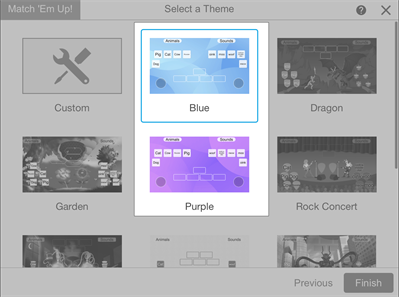 |
March 2023New class session link and QR code for joining lessons | Helping your students join the live lesson is now easier with the new URL and QR code feature. Send out a URL to your students or print the QR code to post in your classroom to make it easy for your students to join – no need to enter in the class ID! |
|---|
August 2022Activity dashboard for student data | Use the activity dashboard to see your students’ progress as they complete an activity. The dashboard gives you insights into how the class is doing with the activity overall as well as individual insights after a student has completed the activity. 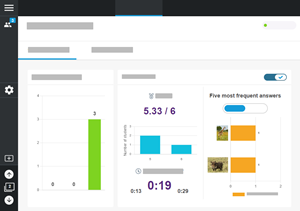 The activity dashboard is available for the following activities:
|
|---|---|
Equation editor | Use the equation editor to quickly add MathType and ChemType equations to a presentation page that you can convert to a Whole-Class Whiteboard, Group Workspace, or Individual Handout activity. Learn more. 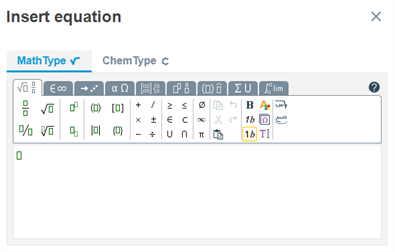 |
New languages | Lumio is now available in Ukrainian, Greek, and Russian. |
July 2022Home page updates and interface improvements | We made improvements to the Lumio home page (now the My Library tab) to make it easier for you to add, import, organize, and navigate your library.  |
|---|