Inviting participants and moderating a meeting
Remote and in-room participants can use the SMART TeamWorks App to connect to your meeting and start collaborating using their own devices. After participants have connected to the workspace, you, as the meeting organizer, can change their participation access to read-only or full access.
Important
Participants must be on the same network as the meeting room computer to connect to the workspace.
Note
If you’re evaluating SMART TeamWorks Room with a free 30-day trial, the ability to share a workspace isn't available.
 Starting a meeting
Before participants can join, you need to start your meeting.
To start a meeting
If the meeting is an ad-hoc meeting, tap Reserve now.
OR
If the meeting a scheduled meeting, tap Start.
Helping participants join your meetingImportant
Participants must be on the same network as the meeting room computer to connect to the workspace.
When you’ve connected your SMART TeamWorks Cloud or SMART TeamWorks Server account, you can share your workspace with participants.
Participants can join using the TeamWorks App or their own SMART TeamWorks Room that’s connected to a TeamWorks Cloud or TeamWorks Server account.
For specific instructions about using each app to connect, click the following links:
For iOS devices, see SMART TeamWorks App for iOS devices.
For Android devices, see SMART TeamWorks App for Android devices.
For Windows computers, see SMART TeamWorks App for Windows 10 computers.
To open the QR code
In the workspace, tap
 , and then tap
 .
.The QR code appears along with the information participants need to connect.
The Session ID and PIN also appear if participants want to enter the meeting information manually.
To join the workspace with the TeamWorks App
Open the TeamWorks App and tap and scan the QR code to join the meeting.
To join the workspace with the TeamWorks Room
In the workspace, click
, and then click Connect to meeting.Enter the Session ID and PIN, and then click
 .
.
Inviting participants to your meetingAfter you’ve started your meeting, you can quickly invite participants.
To invite participants to your meeting
- In the workspace, tap, and then tap
 .
. Tap Copy link to save the link to the computer’s clipboard. You can then paste the link into an email or chat window and send the link to participants. Participants use the link to join your meeting.
Important
To connect, participants must have the TeamWorks App installed on their device.
Managing participantsControl participants' access while they're connected to the meeting . The two types of access are:
Write: The participant sees the workspace on their device and can interact with it. They can add objects, write notes, take screen captures, and do anything from the SMART TeamWorks Room app’s workspace that can be done on the meeting room’s SMART TeamWorks Room workspace.
Read: Participants can view the workspace but can't add anything. Their workspace’s toolbar is disabled.
The participant manager indicates the type of access a participant has:
 : Participant has write access
[Blank]: Participant has read access
 : Indicates the session’s organizer
To change participant access type
In the workspace, tap
, and then tap to open the participant manager.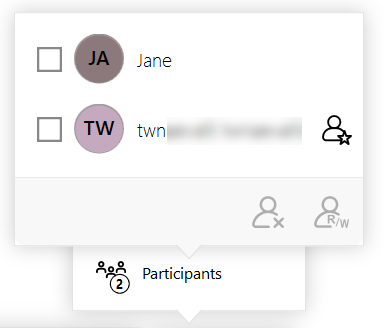
Select the check box for one or more participants whose access you want to change, then and tap
 .
.Note
The appearance of these icons may differ depending on the selected participants' current access permissions.
To remove a participant from the meeting
In the workspace, tap
, and then tap to open the participant manager.
Select the check box for one or more participants you want to remove and tap
 .
.Note
The appearance of these icons may differ depending on the selected participants' current access permissions.
Keywords |
|