Manage apps on iQ 4 devices
Three common app management activities are enabling, disabling, and stopping apps. You can complete these activities—as well as clearing app data and uninstalling apps—for a single device from the device’s dashboard.
You can manage apps on a single device, all devices that match a saved filter’s criteria, or a group. Alternatively, you can:
Use a trigger to initiate the action at a scheduled time or when a specific event takes place.
Include the action in workflows.
SeeCreate workflows
Important
Take care when disabling an app because devices might not work correctly without the app.
You can also enable and disable apps using SMART Remote Management commands.
 Enabling apps
Apps are enabled by default. If you or another administrator disabled apps on one or more devices, you can re-enable them from SMART Remote Management.
To enable apps
Click Devices
 to open the Devices view.
Choose one of the following options:
Option
Steps
Enable apps on a single device
Click the device’s row.
The device’s dashboard window appears.
For each app you want to enable, click Actions
 in the app’s row and select App Management
 Enable App.
Enable apps on devices that match a saved filter
Click Filters
 to open the filters panel and then click Browse saved.
Click Actions
in the saved filter’s row and select App ManagementEnable App.The Enable App window appears.
Click Add to list
 for each app you want to enable.
Click Enable.
Enable apps on all devices in a group
If the groups panel isn’t visible, click
 Groups.
Click Actions
in the group’s row and select App ManagementEnable App.The Enable App window appears.
Click Add to list
for each app you want to enable.Click Enable.
Disabling appsIf you want to prevent users from using an app but don’t want to remove the app entirely from devices, you can disable the app from SMART Remote Management.
To disable apps
Click Devices
to open the Devices view.Choose one of the following options:
Option
Steps
Disable apps on a single device
Click the device’s row.
The device’s dashboard window appears.
For each app you want to disable, click Actions
in the app’s row and select Disable app.
Disable apps on devices that match a saved filter
Click Filters
to open the filters panel and then click Browse saved.Click Actions
in the saved filter’s row and select App ManagementDisable App.The Disable Apps window appears.
Click Add to list
for each app you want to disable.Click Disable.
Disable on all devices in a group
If the groups panel isn’t visible, click
Groups.Click Actions
in the group’s row and select App ManagementDisable App.The Disable Apps window appears.
Click Add to list
for each app you want to disable.Click Disable.
Preventing users from installing appsTo prevent users from installing apps on SMART Board interactive displays and Android devices, you can either disable the App Store app or uninstall the Google Play store from those devices.
Note
When you disable the App Store app on a device, the App Store icon will still appear on the device, but users will not be able to open the app.
To disable the App Store
Click Devices
to open the Devices view.Choose one of the following options:
Option
Steps
Disable the App Store on a single device
Click the device’s row.
The device’s dashboard window appears.
For each app you want to enable, click Actions
in the app’s row and select Disable app.Click Add to list
for the App Store app.Click Disable.
Disable the App Store on devices that match a saved filter
Click Filters
to open the filters panel and then click Browse saved.Click Actions
in the saved filter’s row and select App ManagementDisable App.The Disable App window appears.
Click Add to list
for the App Store app.Click Disable.
Disable the App Store on all devices in a group
If the groups panel isn’t visible, click
Groups.Click Actions
in the group’s row and select App ManagementDisable App.The Disable App window appears.
Click Add to list
for the App Store app.Click Disable.
To uninstall the Google Play store
Click Devices
to open the Devices view.Choose one of the following options:
Option
Steps (New UI)
Uninstall the Google Play store on a single device
Click the device’s row.
The device’s dashboard window appears.
For the Google Play Store app, click Actions
in the app’s row and select Uninstall App.
Uninstall the Google Play store on devices that match a saved filter
Click Filters
to open the filters panel and then click Browse saved.Click Actions
in the saved filter’s row and select App ManagementUninstall App.The Uninstall App window appears.
Click Add to list
for the Google Play Store.Click Uninstall.
Uninstall the Google Play store on a group of devices
If the groups panel isn’t visible, click
Groups.Click Actions
in the group’s row and select App ManagementUninstall App.The Uninstall App window appears.
Click Add to list
for the Google Play Store.Click Uninstall.
Stopping appsYou can stop any apps currently running on a device from SMART Remote Management. This is particularly useful when you are working with users to troubleshoot issues with their devices.
Important
Take care when stopping an app because devices might not work correctly without the app.
To stop apps
Click Devices
to open the Devices view.Click the device’s row.
The device’s dashboard window appears.
For each app you want to stop, click Actions
in the app’s row and select Stop app.
Clearing app dataYou can clear an app’s data using SMART Remote Management. This is particularly useful when you are working with users to troubleshoot issues with their devices.
Important
Take care when clearing app data because apps might not work as expected after being cleared.
To clear app data
Click Devices
to open the Devices view.Choose one of the following options:
Option
Steps
Clear app data on a single device
Click the device’s row.
The device’s dashboard window appears.
For each app for which you want to clear data, click Actions
in the app’s row and select App ManagementClear App Data.
Clear app data on devices that match a saved filter
Click Filters
to open the filters panel and then click Browse saved.Click Actions
in the saved filter’s row and select App ManagementClear App Data.The Clear App Data window appears.
Click Add to list
for each app for which you want to clear data.Click Clear.
Clear app data on all devices in a group
If the groups panel isn’t visible, click
Groups.Click Actions
in the group’s row and select App ManagementClear App Data.The Clear App Data window appears.
Click Add to list
for each app for which you want to clear data.Click Clear.
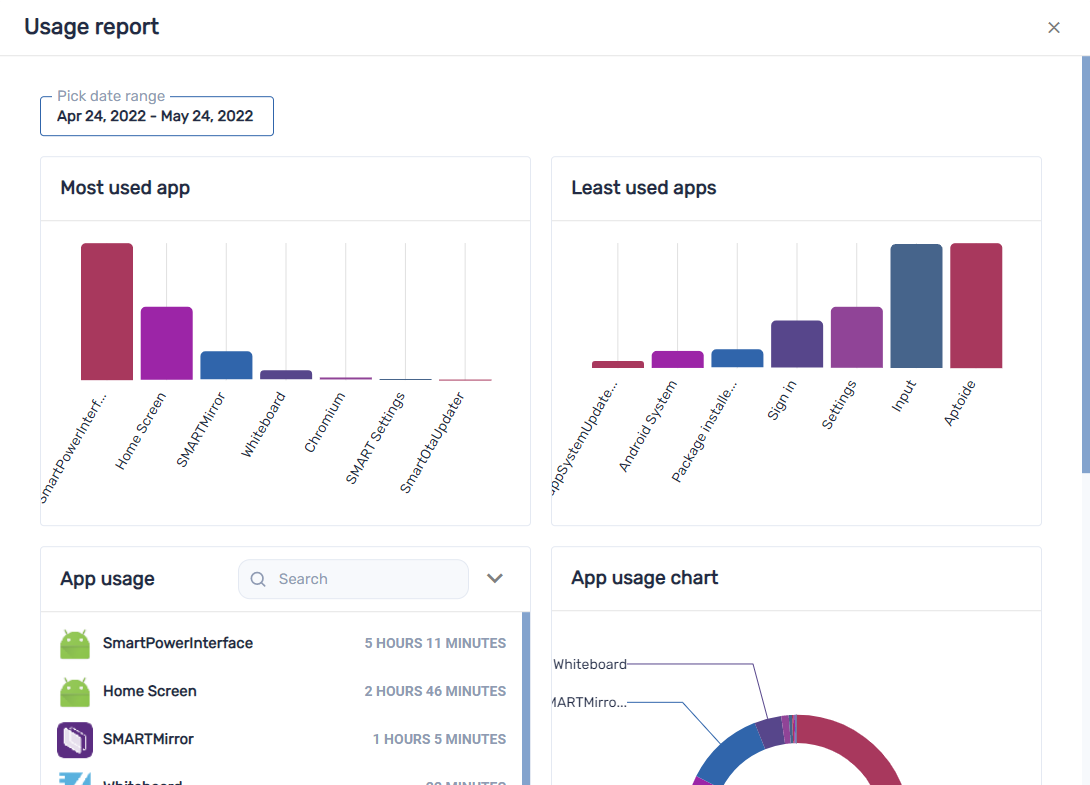
Viewing app usage dataYou can view apps currently running on a device and detailed app information for the device using SMART Remote Management. You can create an app usage report for a single device, all devices that match a saved filter’s criteria, or a group. This report displays app usage data, including the most- and least-used apps on the devices. Usage data is helpful for determining which apps are being used in your organization and which aren’t and can be either disabled or uninstalled.
To view apps currently running on a device
Click Devices
to open the Devices view.Click the device’s row.
The device’s dashboard window appears.
Click Usage
 .
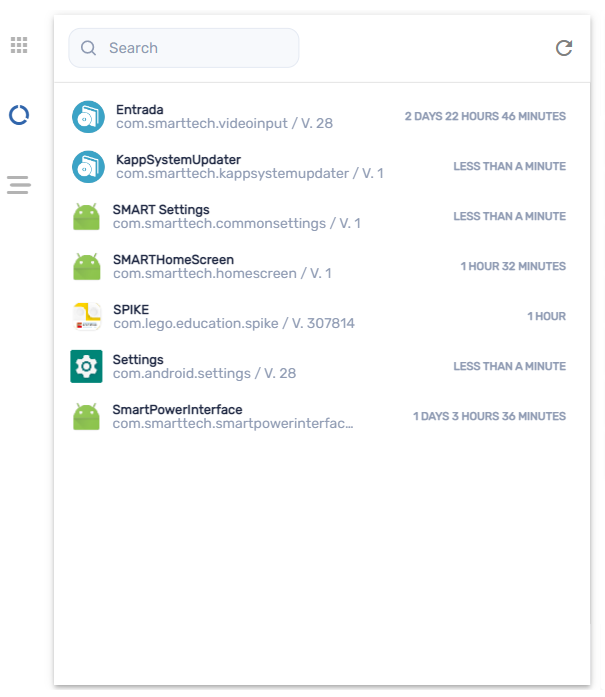
.A list of all apps currently running on the device appears.
To view detailed app information for a device
Click Devices
to open the Devices view.Click the device’s row.
The device’s dashboard window appears.
Click Advanced stats
 .
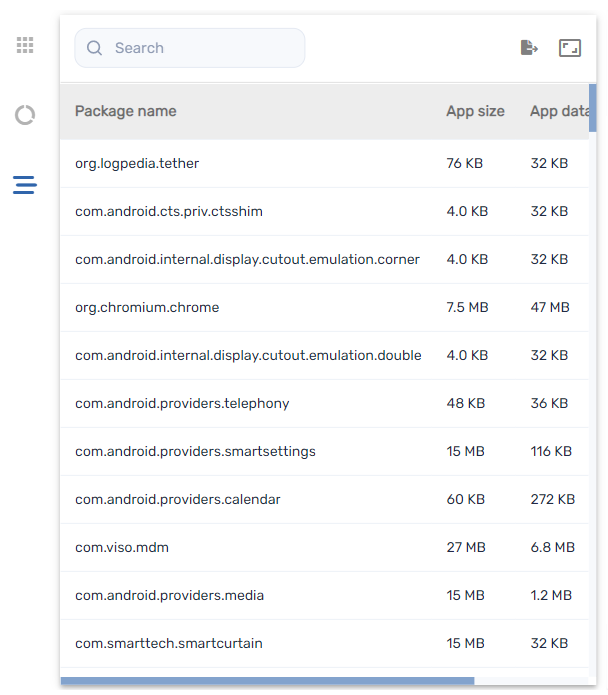
.A table with detailed app information for the device appears.
Tip
You can do the following:
Search for specific information using the Search box.
Export information to a CSV file by clicking Export to CSV
 .
.Display the information in the tab in an expanded view by clicking Expand
 .
.
To create an app usage report
Click Devices
to open the Devices view.Choose one of the following options:
Option
Steps
Create a report for a single device
Click Devices
to open the Devices view.Select the check box for the device you want to view.
Click Insights.
A list of all apps currently running on the device appears along with app usage statistics.
Create a report for all devices in a group
If the groups panel isn’t visible, click
Groups.Select a group.
Click Insights.
The app usage report for the devices appears. By default, the report displays app usage data for the last month.
Tip
You can change the report’s start and end dates using the calendar. In the App usage section of the report, you can do the following:
Search for specific information using the Search box.
Export information to a CSV file by clicking Export to CSV
.Sort the list of apps by clicking Sort ascending
 or Sort descending
 .
.