Using the multistylus
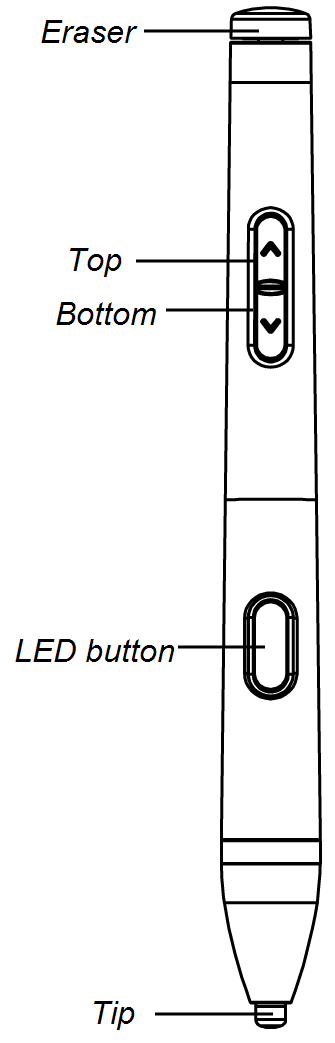
You can use the SMART MultiStylus to write and draw in digital ink on compatible SMART Board interactive displays. Use the pressure-sensitive tip to control line thickness, and use the pressure-sensitive eraser end to erase digital ink.
To customize the multistylus button functions, presets, or air mouse behavior, open the SMART MultiStylus app on the display running iQ 4.7.2 or later.
Notes
Toast messages appear on the display to confirm when the stylus is docked, removed, or switched between modes.
Return the multistylus to the magnetic docking station when you’re done with it.
Place the multistylus in the center of the docking station to keep it from falling or being damaged.
The multistylus’s LED changes from partially to fully lit when properly placed and connected to the docking station.
 Writing, drawing, and erasing
You can use the multistylus to draw or erase digital ink.
Note
The LED button shows the current mode when first removed from the docking station: solid in the selected ink color for Pen mode, or flashing light blue from bottom to top for Mouse mode.
To write or draw in digital ink
Pick up the multistylus.
Write or draw in digital ink on the screen.
Tip
Apply more pressure to make the line thicker, or less pressure to make it thinner. Hold the multistylus at a 45-degree angle to the display surface.
Press the LED button once to switch between the multistylus presets.
Note
Change the multistylus’s presets or default behavior in the app.
To erase digital ink
Move the eraser end of the multistylus over the digital ink you want to erase.
OR
Move your fist or palm over the digital ink you want to erase.
Changing multistylus presetsYou can change between multistylus presets by pressing the LED button once. The LED flashes once in the selected color.
Notes
A white LED indicates black ink color.
Customize up to six multistylus presets in the SMART MultiStylus app.
Using the multistylus as an air mouse or a clickerYou can use the multistylus as an air mouse or a clicker when the multistylus is in Mouse mode.
Note
The LED button shows the current mode when first removed from the docking station: solid in the selected ink color for Pen mode, or flashing light blue from bottom to top for Mouse mode.
To use the multistylus as an air mouse
Press the Top and Bottom arrow buttons simultaneously.
The air mouse cursor
 appears on the screen to indicate that the multistylus is in air mouse mode.
Aim the eraser end of the multistylus at the display and use the arrow buttons to navigate like a standard computer mouse.
By default, the top arrow setting is Mouse left click.
By default, the bottom arrow setting is Mouse right click.
Tips
Step back from the display for greater control over the mouse.
Customize air mouse settings and buttons in the SMART MultiStylus app.
Switch back to Pen mode by pressing the Top and Bottom arrows simultaneously.