Tour of the display for users
Before using the display for the first time, take this tour to familiarize yourself with its components:
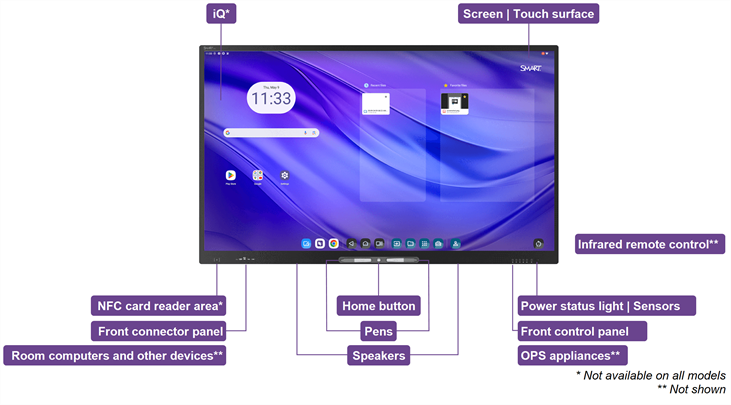
 iQ
iQiQ is the embedded Android operating system on non-high-secure SMART Board M Pro series interactive display models.
iQ runs on Android 13 (or later) and is EDLA-licensed by Google.
Displays with iQ feature one‑touch access to collaborative tools, including a whiteboard, wireless screen sharing, and a web browser. With minimal network integration, there’s no need for wires, cables, or manual software and firmware updates.
SeeiQ 4
Screen | Touch surfaceThe display comes in the following screen sizes:
55"
65"
75"
86"
You can do everything on the display that you can do at your computer—open and close applications, meet with others, create new documents or edit existing ones, visit websites, play and manipulate videos, and so on—by touching the display’s touch surface.
You can also use a variety of gestures within applications, including panning, scaling, rotating, and zooming in and out.
SeeUsing touch
PensThe display comes with two pens, which you can use to write or draw on the screen.
Use your fist or palm to erase digital ink on the screen.
With Object Awareness, the display responds automatically to the tool or object you’re using, whether it’s a pen, finger, or palm. The display’s simultaneous tool differentiation technologies allow two people to write independently and simultaneously.
Power status light | SensorsThe power status light indicates the display’s status:
When the power status light is red, the display is in Standby mode.
When the power status light is green, the display is in normal operating mode.
The display includes an infrared sensor that works with the infrared remote control and an ambient light sensor that can detect the brightness of the room and adjust the screen’s brightness accordingly.
Infrared remote controlYou can use the remote control to turn the display on and off, adjust display settings, and so on.
Home buttonPress the Home button to return to the iQ Home screen at any time.
Front control panelThe front control panel contains buttons for turning the display on and off, controlling the volume, freezing and unfreezing the screen, and showing and hiding a screen shade.
Front connector panelThe front connector panel includes connectors for up to two computers or other devices as well as USB peripherals. Use it to connect your laptops, peripherals, and other devices to the display.
Room computers and other devicesRoom computers, peripherals, and other devices might be connected to the display’s side and bottom connector panels. You can switch to these devices’ inputs to view and interact with them.
The display comes with SMART software that your organization can install on connected computers to take full advantage of the display’s features while using the connected computers.
OPS appliancesThe display also includes an OPS accessory slot. If a SMART OPS appliance is installed in this slot, you can switch to its input and view and interact with it as well.
SeeOPS appliances
SpeakersThe display includes two integrated speakers, designed to provide sound at the front of a room.
As an alternative to using these integrated speakers, your organization might have connected an external audio system to the display.
Whether you use the integrated speakers or an external audio system, you can adjust the volume using the front control panel or the remote control.
NFC card reader areaNon-high-secure SMART Board M Pro series interactive displays’ integrated RFID NFC reader/writer supports a variety of contactless identification cards. You can use third-party, CCID compatible NFC cards and software with features such as logging in to Windows or other operating systems on a connected computer.