Using the front control panel
The front control panel contains buttons for switching inputs, showing and hiding a screen shade, controlling the volume, freezing and unfreezing the screen, and turning the display on and off.
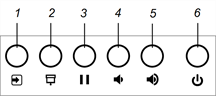
No. | Name | Procedure |
|---|---|---|
1 | Input select | Press to switch inputs. |
2 | Screen shade | Press to hide screen contents behind a screen shade. |
3 | Freeze | Press to freeze and unfreeze the screen. |
4 | Volume decrease | Press to turn down the volume. |
5 | Volume increase | Press to turn up the volume. |
6 | Power | Press to wake the display and press again to enter Sleep mode. |