Tour of the accessory kit
Take this tour to familiarize yourself with the accessory kit’s components:
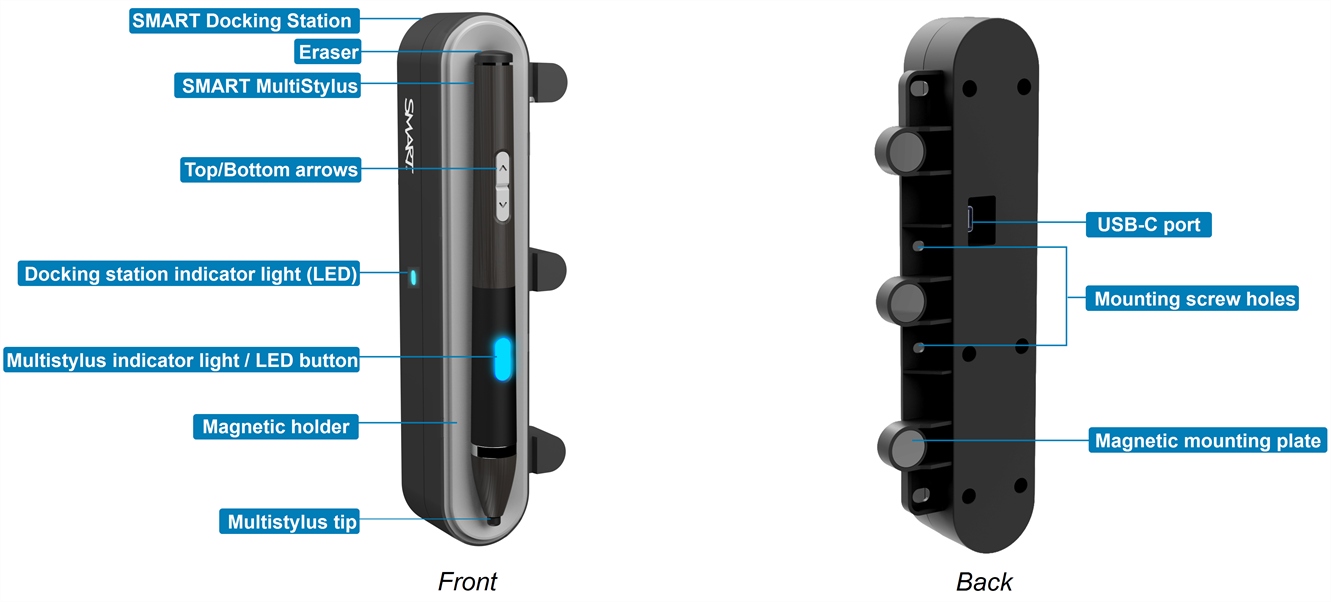
 SMART Docking Station
The docking station stores and charges the multistylus when not in use. It also contains Tool Explorer (V2) technology, which enables compatibility with Tool Explorer (V2) stamps and cubes on supported SMART Board interactive displays.
EraserPressure-sensitive eraser used to erase digital ink on the screen. It can be customized in Mouse mode using the SMART MultiStylus app.
SMART MultiStylusThe SMART MultiStylus is an active multistylus designed for use with compatible SMART Board interactive displays. It supports pressure-sensitive writing, customizable buttons, and rechargeable power.
Up/Down buttonsCustomizable buttons that can be programmed for specific functions in the SMART MultiStylus app when using a display with iQ 4.7.2 or later. Browse through web pages, presentation slides, and use the buttons as an air mouse.
Use the buttons to switch between Mouse and Pen mode.
Docking station indicator light (LED)Shows the status of the docking station’s connection.
Multistylus indicator light / LED buttonThe indicator light shows charging and status information. Press the button to switch between pen presets and other customizable options.
Mounting screw holesAllow the docking station to be securely installed.
USB-C portConnects the docking station to the display's USB Service Port 2.
Magnetic holderHolds the multistylus in place while charging or storing.
Magnetic mounting plateAttaches the docking station to SMART Board interactive display.
Multistylus tipPressure-sensitive tip used for writing and drawing on the display surface.