Using the stylus
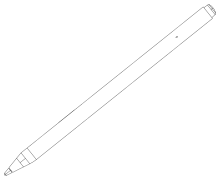
The interactive podium includes a rechargeable stylus, which you can use to write notes and draw on the interactive podium's screen in digital ink. Hold the stylus as you would hold any normal pen or pencil. As you work with the podium, you can rest your hand on the podium's screen, just as if it were a sheet of paper. You can tilt the stylus in any way that feels most comfortable for writing or drawing.
You can erase digital ink using the eraser end of the stylus.
Note
If the indicator light on the stylus is off, press the eraser or the button on the side of the stylus to wake it up. If it doesn’t illuminate, the stylus may need to charge. Place the stylus in the charging tray on the top of the podium.
Important
You can write notes over applications and your desktop only if SMART Product Drivers 12.27 and SMART Ink 5.20 or higher is running on your computer. If the SMART Board icon in the Windows notification area or Mac Dock has a small red x in the lower right corner  , SMART Product Drivers is not running on your computer or is older than 12.27, or the podium is not connected properly.
Tips
Store the stylus in the charging tray or the magnetic holders on either side of the podium when it’s not in use.
You can use SMART Notebook software, SMART Meeting Pro software, or Lumio online to make your presentations interactive and dynamic. For more details on what you can accomplish with SMART Notebook software, SMART Meeting Pro software, or Lumio, see the SMART software’s online Help.
 Stylus components
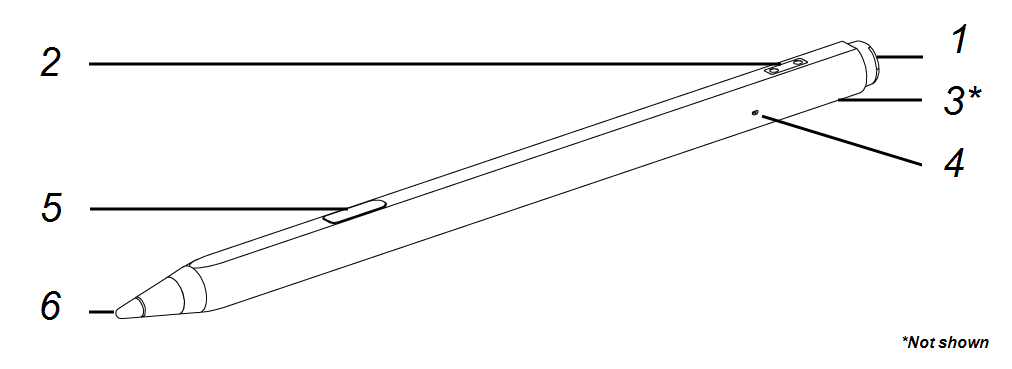
This illustration shows the stylus’s components.
No. | Component | Description |
|---|---|---|
1 | Fine eraser | Turn the stylus around and move the eraser over the area you want to erase, just as you would use the eraser on a pencil. If the indicator light is off, press the eraser button to turn on the stylus. |
2 | Charging contact | Align the charging contact points to the pogo pins in the charging tray at the top of the interactive podium to charge the stylus. |
3 | Stylus tether slot | Attach the tether to the stylus through this slot. |
4 | Indicator light (LED) | The indicator light is lit when the stylus is on. If the indicator light on the stylus is off, press the eraser or the button on the side of the stylus to wake it up. If it doesn’t illuminate, the stylus may need to charge. Place the stylus in the charging tray on the top of the podium. |
5 | Stylus button | Use the stylus button just as a you would use the right-click button on a computer mouse. If the indicator light is off, press the button to turn it on. Press and hold the button and tap the screen to enable right click. |
6 | Stylus nib | Press a Stylus color button on the Utility bar, and then touch the stylus nib to the screen surface to write with digital ink. Caution Replace a stylus nib when the nib wears down. If a stylus nib wears down too far, you might scratch or damage the podium's surface. Extra nibs are supplied with the interactive podium. |
Charging the stylusPick up the stylus to draw or erase digital ink. Replace the stylus when you’re done using it to charge it. When you first pick up the stylus from the charging tray or magnetic holder, you may have to activate it by pressing the stylus button or the fine eraser on the end of the stylus. The stylus light turns on to indicate the stylus’s status:
Light | Stylus status | Action |
|---|---|---|
Off | The stylus is off. | To wake up the stylus, press the button on the side of the stylus, or press the eraser. |
Off (while in the charging tray) | The stylus is off and not charging. Note This could be because the stylus is not properly contacting the charging points, or because it is in a normal 55 minute rest period between charging cycles. | Pick up the stylus and activate it by pressing the side button or eraser. |
Solid green | The stylus is on and ready to be used | Pick up the stylus and use it to write on the display. Return the stylus to the charging tray or magnetic holder when you're done. |
Solid green (while in the charging tray) | The stylus is on and not charging. Note This could be because the stylus is not properly contacting the charging points, or because it is in a normal 55 minute rest period between charging cycles. | Pick up the stylus and use it to write on the display. Return the stylus to the charging tray or magnetic holder when you're done. |
Flashing green | The stylus is in the charging tray and is charging. Note The stylus charges for five minutes every hour when in the charging tray. | Pick up the stylus and use it to write on the display. Return the stylus to the charging tray or magnetic holder when you're done. |
Solid red | The stylus battery is very low. Note The red LED will illuminate for ten seconds and then the stylus will turn off. | Place the stylus in the charge cradle for a minimum of two minutes before using it again. |
Replacing stylus nibsTo prevent damage to the podium’s anti-glare surface, replace stylus nibs when they become worn. Extra stylus nibs are included in the packaging.
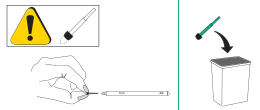
Pull out the worn nib from the stylus and discard appropriately.
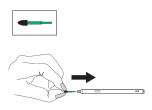
Insert a new nib into the stylus nib hole.
Writing and drawing in digital inkPick up the interactive podium's stylus.
Note
If the indicator light on the stylus is off, press the eraser or the button on the side of the stylus to wake it up. If it doesn’t illuminate, the stylus may need to charge. Place the stylus in the charging tray on the top of the podium.
Use the stylus to write or draw in digital ink.
Quickly change pen colors by pressing the color button on the interactive podium's convenience panel.
Using the SMART Ink dynamic (floating) toolbar
When you start drawing on the screen while viewing a connected computer’s input, the SMART Ink dynamic (floating) toolbar for SMART Ink appears on the screen. You can use this toolbar to temporarily change the pen’s color, thickness, or other properties. You can also access SMART Ink’s other tools, such as screen capture, spotlight, screen shade, and so on.
To learn more about SMART Ink and its toolbar, visit the SMART Product Drivers and Ink support page. Here are a few quick links to get you started:
Erasing digital inkYou can erase digital ink from the screen by moving the eraser end of the stylus over the digital ink you want to erase.