Using the front control panel
The front control panel contains buttons for turning the display on and off, controlling the volume, and switching inputs.
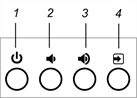
No. | Name | Procedure | For more information |
|---|---|---|---|
1 | Power | Press to wake the display and press again to enter Standby mode. | |
2 | Volume decrease | Press to turn down the volume. | |
3 | Volume increase | Press to turn up the volume. | |
4 | Input select | Press to switch inputs or access the display’s Settings menu. |
Display status | |
|---|---|
Off | Not receiving power. The display is not plugged or the power switch on the back of the display beside the AC power inlet is in the OFF (O) position. |
Amber | In an energy saving mode |
Green | In normal operating mode |