Connector diagrams
 Side and bottom connector panels
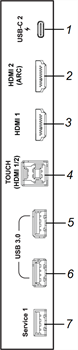
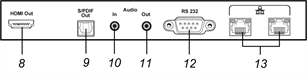
This diagram and table present the connectors on the display’s side and bottom connector panels:
Side
Bottom
No. | Connector | Connects to | Notes |
|---|---|---|---|
1 | USB Type-C | USB Type-C 2 input OR Supported USB drives, peripherals, and other devices | |
2 | HDMI 2.1 In | HDMI 2 (ARC) input (video and audio) OR External video source OR External audio system | This connector supports HDMI ARC (Audio Return Channel) and eARC (Enhanced Audio Return Channel), which allow audio signals to travel between the display and the connected device and improve audio quality as a result. |
3 | HDMI 2.1 In | HDMI 1 input (video and audio) OR External video source | |
4 | USB 3.2 Gen 1 Type B | HDMI 1 input (touch) OR HDMI 2 input (touch) | |
5 | USB 3.2 Gen 1 Type-A | Supported USB drives, peripherals, and other devices | |
6 | USB 3.2 Gen 1 Type-A | Supported USB drives, peripherals, and other devices | |
7 | USB 3.2 Gen 1 Type-A | N/A | This connector is a service port. |
8 | HDMI 2.1 Out | External display OR External audio system | |
9 | S/PDIF Out | Digital audio output | |
10 | Stereo 3.5 mm In | External audio system | |
11 | Stereo 3.5 mm Out | External audio system | |
12 | RS-232 | Room control system | |
13 | RJ45 (×2) | Network |
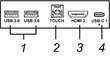
Front connector panelThis diagram and table present the connectors on the display’s convenience panel:
No. | Connector | Connects to | Notes |
|---|---|---|---|
1 | USB 3.2 Gen 1 Type-A | Supported USB drives, peripherals, and other devices | |
2 | USB 3.0 Type-B | HDMI 3 input (touch, microphone, camera, and other USB peripherals) | |
3 | HDMI 2.1 in | HDMI 3 input (video and audio) OR External video source | |
4 | USB Type-C | USB Type-C 1 input OR Supported USB drives, peripherals, and other devices |