Connector diagrams
 Side and bottom connector panels
This diagram and table describe the connectors on the display’s connector panel:
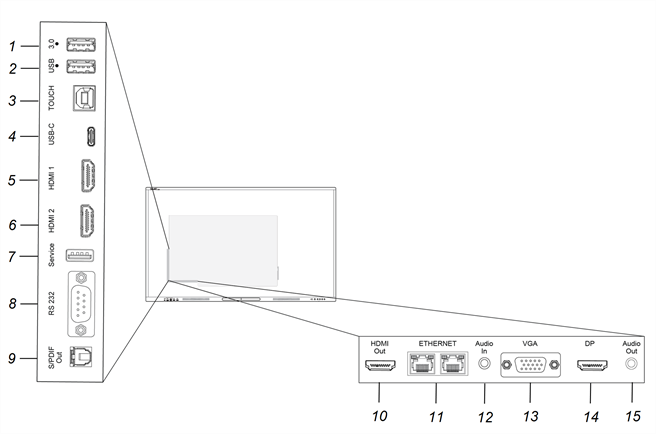
No. | Connector | Connects to | Notes |
|---|---|---|---|
1 | USB 3.2 Gen 1 Type-A | Supported USB drives and other peripherals | The connector will switch to the active input, including the display’s embedded OS, the OPS slot computer, or an external computer. Note Connect a USB mouse to navigate the display’s on-screen menu during troubleshooting. |
2 | USB 3.2 Gen 1 Type-A | Supported USB drives and other peripherals | The connector will switch to the active input, including the display’s embedded OS, the OPS slot computer, or an external computer. Note Connect a USB mouse to navigate the display’s on-screen menu during troubleshooting. |
3 | USB 2.0 Type-B | Touch | |
4 | USB 2.0 Type-C | USB Type-C 1 input (supported USB drives, video, audio, and touch) | The connector will switch to the active input, including the display’s embedded OS, the OPS slot computer, or an external computer. |
5 | HDMI 2.0 | HDMI 1 input (video and audio) | |
6 | HDMI 2.0 | HDMI 2 input (video and audio) | |
7 | USB 2.0 Type-A | N/A | This connector is a service port (connects to the embedded OS). |
8 | Room control system | ||
9 | S/PDIF Out | Digital audio output | |
10 | HDMI 2.0 out | External display | |
11 | RJ45 (×2) | N/A | N/A |
12 | Audio in (stereo 3.5 mm) | VGA input (audio) | Use this audio input with Stereo 3.5 mm in. |
13 | VGA in | VGA input (analog video) | Use this video input with analog video sources (VGA). Use this video input with Touch (USB) connector for touch control. |
14 | Display Port 1.2 | Display Port 1.2 input (video and audio) | |
15 | Audio out | External audio system |
Front connector panelThis diagram and table describe the connectors on the display’s front connector panel:
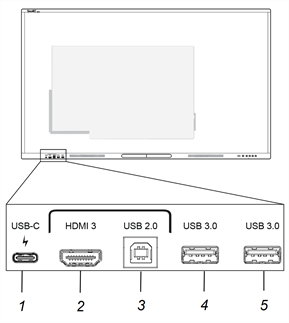
No. | Connector | Connects to | Notes |
|---|---|---|---|
1 | USB 2.0 for the embedded OS and OPS slot computer USB 3.2 Gen 1 for peripherals | USB Type-C 2 input (video, audio, and touch) | The connector will switch to the active input, including the display’s embedded OS, the OPS slot computer, or an external computer. Note The USB 3.2 Type-C connector can also provide 15 W of power to connected devices. |
2 | HDMI 2.0 in | HDMI 3 input (video and audio) | |
3 | USB 2.0 Type-B | Touch input | Use this touch input with the HDMI video and audio input on the front of the display. |
4 | USB 3.2 Gen 1 Type-A | Supported USB drives and other peripherals | The connector will switch to the active input, including the display’s embedded OS, the OPS slot computer, or an external computer. |
5 | USB 3.2 Gen 1 Type-A | Supported USB drives and other peripherals | The connector will switch to the active input, including the display’s embedded OS, the OPS slot computer, or an external computer. |