Setting up your document camera
Before you use the SMART Document Camera, unfold and position it, then connect it to power to fully charge the battery. Before you connect the document camera to a device, install the software on the device. After the software’s installed, you can connect the document camera to that device.
To unfold and position your document camera
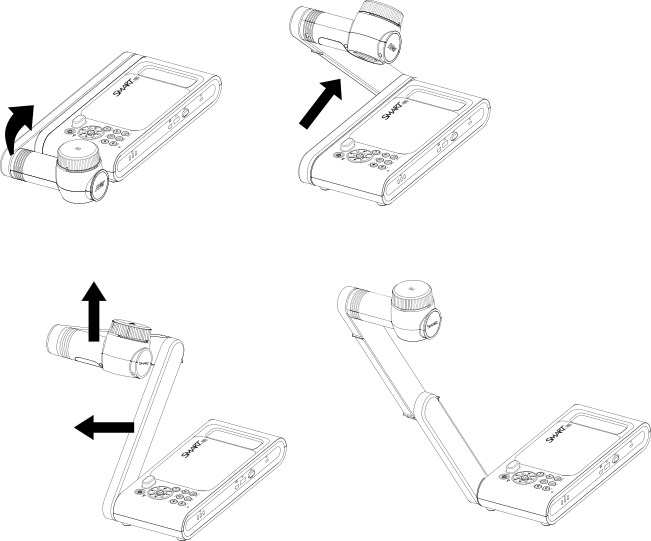
Hold the handle of the document camera to stabilize it.
Lift the camera arm up, then pull the camera arm outward.
Rotate the camera head and aim the lens at your object.
To connect your document camera to the power supply and charge the battery
Connect the provided power supply cable to the DC port on the right connection panel.
Note
Before you use the camera for the first time, charge the battery fully. The battery charge indicator on the front panel shows you the battery’s status. For more information about the battery charge indicator, see Battery charge indicator.
Connect the power supply cable to a power outlet.
After the power is connected, the document camera enters Standby mode and starts charging.
Models |
|
Keywords |
|
Related documents |