Connecting power and turning on the podium for the first time
The final step in installing the podium is to connect power, and turn on the podium.
To connect the podium to power
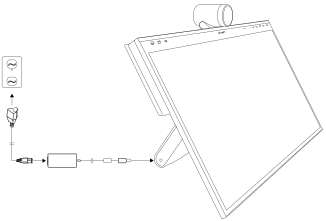
Connect the supplied power cable to the supplied power adapter.
Connect the cable from the AC power inlet on the podium’s side connector panel to a power outlet.
Note
Refer to the podium’s specifications for its normal power requirements and power consumption information.
To turn on the podium
Press the Power button on the back of the podium.
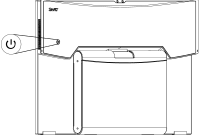
Wait for the screen to show the SMART logo and the
 icon to appear.
Tap Settings
on the screenOR
Press Settings
on the utility bar to select the input of a connected device.The connected device’s input appears on the screen.
Note
Touch is not available immediately after switching inputs, waking, or turning on the podium. Wait until the connected computer is fully connected to the podium, then the connected computer will respond to touches on the podium.
Configure the screen on the connected device to your preferences.
Note
If you’re extending the screen of your connected device, make sure you Orienting the interactive podium.