Connecting room computers and guest laptops
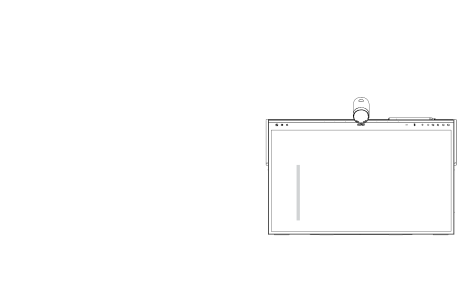
You can connect room computers and guest laptops to the podium and view and interact with them.
Orient the interactive podium after you connect it to your computer.
Warning
Ensure that any cables that cross the floor to the SMART product are properly bundled and marked to avoid a trip hazard.
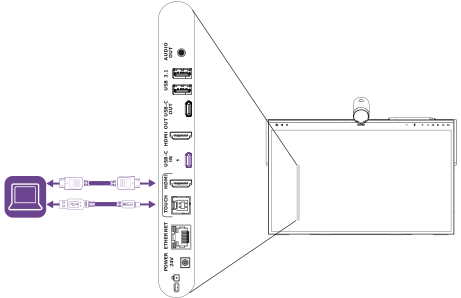
- USB-C IN
- HDMI
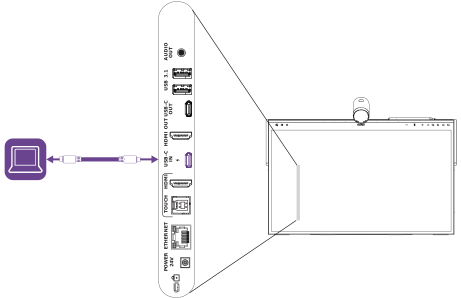
Connector | Standard | Connection type |
|---|---|---|
USB-C IN | USB 2.0 (as DFP) Display Port 1.4a, HDCP 2.3, USB 2.0 (as UFP) | Video/audio/touch/network |
Warning
Ensure that any cables that cross the floor to the SMART product are properly bundled and marked to avoid a trip hazard.
Caution
When connecting a USB cable to a computer, make sure the computer has a USB compliant interface and bears the USB logo. In addition, the USB source computer must be compliant with IEC 60950‑1 and/or IEC 62368‑1. The source computer must be CE marked and carry safety certification marks for Canada and USA. This is for operating safety and to avoid damage to the SMART Board Mini 727.
Notes
A room computer or guest laptop connected to the podium through a Type-C receptacle has access to any networks connected to the display by Ethernet.
Your organization’s installers might have connected cables to the podium and run the cables behind a wall or under the floor to a desk or table where you can place your computer.
 Viewing a connected computer’s input
Connect the computer to the interactive podium.
View the available inputs in one of the following ways:
Tap
 on the podium's touch surface or utility bar, then tap
  Inputs & Outputs.
OR
Press input select
on the podium's left side of the utility bar.
- Tap the connected computer’s input option.
Setting a connected computer’s resolution and refresh rateThis table presents the recommended resolutions and refresh rates supported by the podium's USB-C and HDMI inputs:
Resolution | Input aspect ratio | Mode | Refresh rate |
|---|---|---|---|
3840 × 2160 | 16:9 | UHD/2160p | 59.94 Hz/60 Hz 50 Hz 29.97 Hz/30 Hz 25 Hz 23.98 Hz/24 Hz |
1920 × 1080 | 16:9 | FHD/1080p | 59.94 Hz/60 Hz 50 Hz 29.97 Hz/30 Hz 25 Hz 23.98 Hz/24 Hz |
1360 × 768 | 16:9 | HD | 60.015 Hz |
1366 × 768 | 16:9 | HD | 60.015 Hz |
1280 × 720 | 16:9 | HD/720p | 59.94 Hz/60 Hz 50 Hz 29.97 Hz/30 Hz 25 Hz 23.98 Hz/24 Hz |
720 × 480 | 16:9 | 480p (DVD player) | 60 Hz |
If possible, set connected computers to these resolutions and refresh rates. See the connected computers’ operating system documentation for instructions.
Connecting USB drives, peripherals, and other devicesYou can use USB drives, peripherals, and other devices with a computer connected to the podium using the USB receptacles on the podium’s side connector panel.