On-screen menus and controls
The SMART Board NX series display features a number of on-screen menus and controls.
Tap an interface element’s label in this diagram to learn more about the feature:
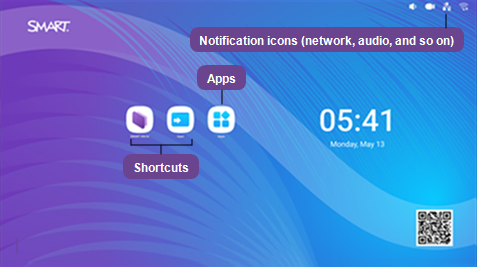
The SMART Board NX series display features a number of on-screen menus and controls.
 Notification icons (network, audio, and so on)
The notification icons provide information about the display’s network connection, speaker status, and connected USB drives.
Icon | Description | Notes |
|---|---|---|
 | Connected to a wireless network and signal strength | The Wi‑Fi signal strength being received by the display. Tap the icon to open the Wi‑Fi settings. SeeNetwork |
 | Disconnected from a wireless network | Indicates the display is not connected to a wireless network. Note The display cannot connect to an Ethernet and wireless network simultaneously. Tap to open the Wi‑Fi settings page. SeeNetwork |
 | Connected to a wired network | Indicates the display is connected to an Ethernet network. |
 | Disconnected from a wired network | Indicates the display is not connected to an Ethernet network. |
 | Speakers are on | The display’s speakers are turned on. |
 | Speakers are off | The display’s speakers are turned off. |
AppsOpen a menu of apps installed on the display, such as SMART Mirror, Browser, SMART Remote Management, Input settings, and Display settings.