Connector diagrams
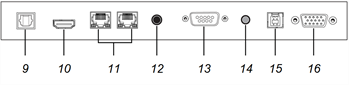
 SMART Board 6000S (V3) connector panel
The following diagram and table present the connectors on the display’s connector panel:
Side

Bottom
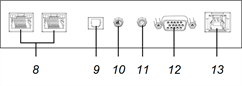
SMART Board 6000S (C) and 6000S connector panelThis diagram and table present the connectors on the display’s connector panel:
Side
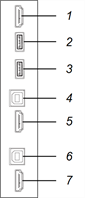
Bottom
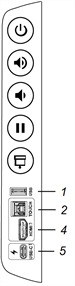
Convenience panelThe following diagram and table present the connectors on the display’s convenience panel:
SMART Board 6000S (V3)
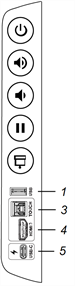
SMART Board 6000S (C)
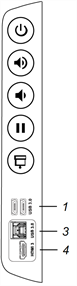
SMART Board 6000S
No. | Connector | Connects to | Notes |
|---|---|---|---|
1 | USB 3.0 Type-A 1 | Supported USB drives, peripherals, and other devices | See Connecting USB drives, peripherals, and other devices and USB cables and connectors. |
2 | USB 2.0 Type-B | HDMI 3 input (touch) | See Connecting room computers and guest laptops and USB cables and connectors. |
3 | USB 3.0 Type-B | HDMI 3 input (touch) | See Connecting room computers and guest laptops and USB cables and connectors. |
4 | HDMI 2.0 in | HDMI 3 input (video and audio) | See Connecting room computers and guest laptops and HDMI cables and connectors. |
5 | USB Type-C 2 | USB-C | See Connecting room computers and guest laptops and HDMI cables and connectors. |