Mounting your interactive flat panel
To mount your SMART Board 4000 series interactive flat panel on a wall, you require a team of professional installers.
This page is intended for installers. Installers should read this page along with the installation instructions included with the interactive flat panel before they mount the interactive flat panel.
Warning
Improper mounting of the interactive flat panel can result in personal injury and product damage.
 Before mounting the interactive flat panel
Perform these tasks before mounting your interactive flat panel:
Review the environmental requirements in the interactive flat panel’s specifications (see Specifications).
Save all product packaging so that it’s available if you need to transport the interactive flat panel. If the original packaging isn’t available, you can purchase new product packaging from your authorized SMART reseller (smarttech.com/where).
Refer to local building codes to ensure the wall can support the weight of the interactive flat panel and mounting equipment.
Model
Weight
SPNL-4055
116 lb 13 oz (53 kg)
SPNL-4065
153 lb (69.4 kg)
SPNL-4070
173 lb. (78.4 kg
SPNL-4075
189 lb (86 kg)
SPNL-4084
238 lb (108 kg)
Use a standard VESA mounting plate (not included) to mount the interactive flat panel on a wall.
Model
Mounting plate
SPNL-4055
600 mm × 400 mm
SPNL-4065
600 mm × 400 mm
SPNL-4070
800 mm × 400 mm
SPNL-4075
1000 mm × 600 mm
SPNL-4084
600 mm × 600 mm
Use M8 screws to fasten the wall bracket.
Caution
Do not over-tighten the screws.
Model
Screw length
Fasten torque
SPNL-4055
25 mm where the total wall mount bracket and washer thickness is less than 7 mm.
97.36–177.01 in-lb. (11–20 N·m)
SPNL-4065
30 mm where the total wall mount bracket and washer thickness is less than 7 mm.
97.36–177.01 in-lb. (11–20 N·m)
SPNL-4070
See the SMART Board 4000 series installation guide for more information
97.36–177.01 in-lb. (11–20 N·m)
SPNL-4075
See the SMART Board 4000 series installation guide for more information.
97.36–177.01 in-lb. (11–20 N·m)
SPNL-4084
See the SMART Board 4000 series installation guide for more information.
97.36–177.01 in-lb. (11–20 N·m)
Because the receptacles might not be easily accessible after the installers mount the interactive flat panel, consider connecting cables for power, computers and other devices while the interactive flat panel is still in its packaging (see Connecting power and devices).
Choosing a mounting locationConsider the following when you select a location for the interactive flat panel:
- Choose a location for the interactive flat panel that’s far from bright light sources, such as windows and strong overhead lighting. IR lighting can cause issues with the performance of the cameras and can lead to unintentional or missed touches.
The wall must be strong enough to support the interactive flat panel and the mounting equipment. See the table below for the weights of the various 4000 series interactive flat panel models:
Model
Weight
SMART Board 4055 116 lb (53 kg) SMART Board 4065 153 lb (69.4) SMART Board 4070 173 lb. (78.4 kg SMART Board 4075 189 lb (86 kg) SMART Board 4084 238 lb (108 kg) Select a wall with a flat, regular surface and sufficient clearance to accommodate your interactive flat panel. Mount the interactive flat panel in a location that’s central to your audience’s viewing direction.
For mobile or adjustable installation options, contact your authorized SMART reseller (smarttech.com/where).
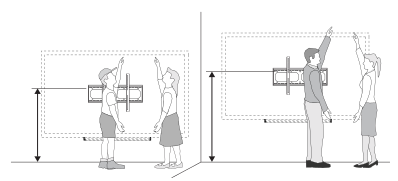
Choosing a mounting heightConsider the general height of the user community when you choose the height for the interactive flat panel.
The flat panel height is based on the midpoint between the reach of the students and the teacher.