Troubleshooting the stand
This section describes how to troubleshoot the wall stand.
 Resolving general issues
Issue | Possible solution |
|---|---|
| The stand does not raise or lower |
|
The display doesn’t fit on the stand. |
|
Recalibrating the standIf the stand lowers but does not move when you try raising it, or if you replace the controller, you may need to calibrate the stand again.
To calibrate the stand
Connect the stand to a power outlet.
Press the Down button and lower the stand to the lowest position.
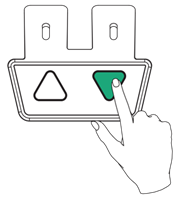
Press the Down button again and hold for five seconds. The stand lowers then bounces up slightly.
Release the Down button
Resetting the circuit breakerIf the stand’s circuit breaker trips and the stand loses power, you must reset the circuit breaker to restore power.
Ensure the stand is connected to a power outlet.
Push the button beside the AC power inlet.
Power will be restored to the stand.