 This product is discontinued. Learn More
Turning on for the first time
After completing connections for the SMART Chromebox G3, turn on the Chromebox for the first time to complete the setup. You will need a Google account.
To turn on your SMART Chromebox G3 for the first time
Press the Power button on the front panel.
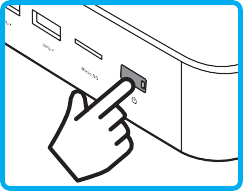
The Power button’s light turns solid white.
Follow the on-screen instructions to complete the initial setup.
Note
You may need to connect a keyboard to complete the initial setup. See Connecting accessories and pairing bluetooth devices (optional).