Connecting accessories and pairing bluetooth devices (optional)
Connect accessories such as a mouse and keyboard to the SMART Chromebox G3 so you can navigate and interact with the desktop. You can also pair Bluetooth devices for use with the SMART Chromebox G3.
SMART Board interactive displays have their own on-screen keyboards and use touch interactions to navigate the desktop, so connecting accessories such as a mouse or keyboard is optional.
Note
If a keyboard is connected, the on-screen keyboard isn’t displayed.
 Connecting accessories
Connect accessories such as a mouse or keyboard to the SMART Chromebox G3. Audio accessories, such as speakers, should be connected to the SMART Board interactive display rather than the SMART Chromebox G3.
Note
The SMART Chromebox G3 supports both wired and wireless mouse and keyboard connections.
To connect a wired mouse and keyboard
Connect the USB mouse and USB keyboard to the SMART Chromebox G3’s USB 2.0 ports.
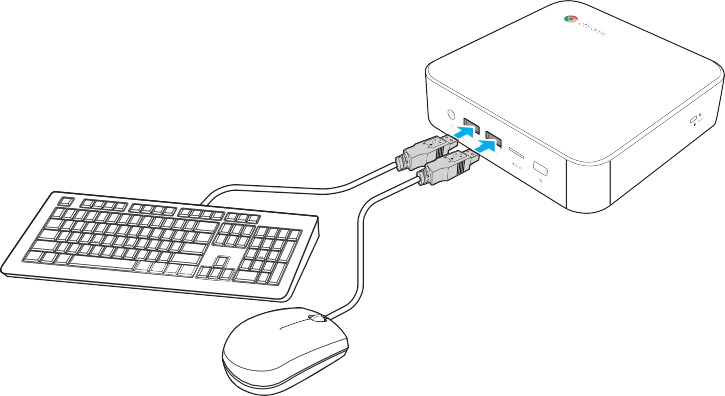
To connect a wireless mouse and keyboard
Connect the USB receiver that is supplied with your wireless mouse and keyboard to the SMART Chromebox G3’s USB port.
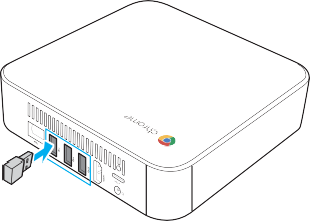
Note
After you turn on the SMART Chromebox G3, the wireless mouse and keyboard should pair automatically. If any additional steps are required, refer to the manual that came with the accessories.
Connecting to Bluetooth devicesClick the Chrome desktop’s Status tray to open it.

Click the Bluetooth icon.
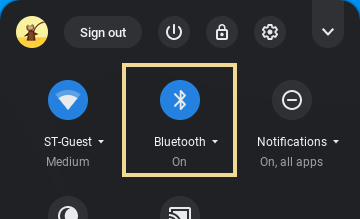
Enable the Bluetooth function.
The SMART Chromebox G3 automatically starts to look for available Bluetooth devices.
Select the Bluetooth device you want to connect and follow the on-screen instructions to complete pairing.