Accessing the Windows 10 desktop and how to close SMART TeamWorks
SMART TeamWorks software is designed to act as a hub for your meeting rooms. It’s intended to be the platform from which you can start a meeting, use the collaborative whiteboard, and launch commonly used applications such as browsers, Microsoft Word, Power BI, and any other application your organization commonly uses. However, you may need to access applications that aren’t found in the launcher. If SMART TeamWorks was configured to hide the desktop’s taskbar and Start menu, you can still access them using options in SMART TeamWorks.
 How to access the Start menu and other windows programs
If SMART TeamWorks was configured to run as a hub on a kiosk style computer, the desktop and task bar may have been hidden. If this is the case, you can access the Windows Start menu by pressing the Windows key  on the keyboard, or tapping the Windows button shown in the launcher’s status bar:

If you don’t see this button, it’s because SMART TeamWorks was not configured to show it. Speak to your IT Administrator about enabling the button in the settings window for SMART TeamWorks:

How to close SMART TeamWorksIf you need to close SMART TeamWorks, you can do so from the notification area of the Windows task bar.
Note
This option is not available if the IT administrator configured SMART TeamWorks to hide the task bar. If you want to have this capability, speak with the IT administrator to change the configuration of SMART TeamWorks.
To close SMART TeamWorks
Press Alt + X on the keyboard.
OR
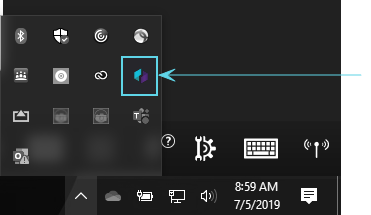
From the Windows task bar, open the notification area and right-click the SMART TeamWorks logo then select Exit.
Keywords |
|