Release notes
You can download the iQ system software for your display from smarttech.com/downloads.
iQ 3.17 SP1 release notes
Release date: | November 20, 2025 |
Versions: | 3.17.9052 |
Expand the sections below to learn more about what’s new in this latest iQ release.
System software
Resolved Issues
Resolved the issue where SMART Board displays didn’t return to sleep after overnight update checks when an active external input, such as an OPS or connected computer, was detected.
Resolved the issue where the power and volume button LEDs on the SMART Board QX Pro series convenience panel remained on while the display was in standby.
Resolved the issue where the power, freeze, and mute buttons on the SMART Board QX Pro series convenience panel did not respond when pressed.
Known Issues
Touch performance, detection, or accuracy may be impacted when the display detects multiple pens, erasers, or fingers that are less than 20 cm from each other (6000S and QX Pro displays only).
In some instances, the Settings app may take up to 30 seconds to load when the display’s mic array is enabled (MX-V4 displays only). This duration to query the display’s mic array status is expected behavior.
Tapping the Computer input on the iQ input screen does not wake up or power on a connected OPS appliance. To resolve, press the power button on the OPS appliance to turn it on.
SMART Remote Management
Highlights
SMART Remote Management (SRM) updated to 25.11.6.931.
Resolved Issues
Resolved the issue where the command to change the wallpaper in Repository Actions > Device settings failed to update the display’s Home screen wallpaper.
Resolved the issue where configuring Automatic date and time in Repository Actions > Device settings failed with an unknown error.
Resolved the issue where configuring language settings in Repository Actions > Device settings failed with an unknown error.
Resolved the issue where the command to configure Wi-Fi settings in Repository Actions > Device settings failed to update the display’s network settings.
Resolved the issue where SMART Board displays showed a generic Android icon in the SMART Remote Management web portal.
Resolved the issue where the command to set Kiosk mode failed.
Resolved an issue that prevented apps from being pushed and installed on a display when a user was signed in.
Resolved reporting and display issues within the SMART Remote Management web portal.
Whiteboard
Resolved Issues
Resolved an issue where after updating to iQ 3.17.9024 on a SMART Board MX-V2, MX-V3, MX-V4, 6000S, 6000S-V3, 7000-V2, or QX Pro series display, users cannot open a PDF file from a USB drive or Board Files.
 iQ 3.17 release notes
Release date: | September 22, 2025 (6000S, 6000S-V3, 7000-V2, MX-V2, MX-V3, MX-V4, QX Pro) October 6, 2025 (7000R) |
Versions: | 6000S, 6000S-V3, 7000-V2, MX-V2, MX-V3, MX-V4, QX Pro: 3.17.9024 7000R: 3.17.9030 |
Expand the sections below to learn more about what’s new in this latest iQ release.
Lumio
Highlights
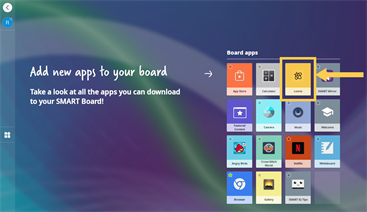
Access Lumio lessons directly from the new Lumio app.
System software
Highlights
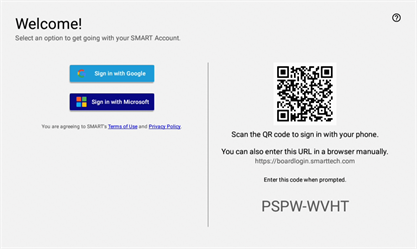
Sign in to a display with your SMART Account using a QR code.
Resolved Issues
Improved speaker volume control when increasing or decreasing the volume (affected MX-V4 displays only).
Resolved issue where signed-in users could not access accessibility settings (affected MX-V3, MX-V4, 6000S-V3, and QX Pro displays only).
Resolved issue where automatic cleanup functionality was not working.
Known Issues
Touch performance, detection, or accuracy may be impacted when the display detects multiple pens, erasers, or fingers that are less than 20 cm from each other (6000S and QX Pro displays only).
In some instances, the Settings app may take up to 30 seconds to load when the display’s mic array is enabled (MX-V4 displays only). This duration to query the display’s mic array status is expected behavior.
Tapping the Computer input on the iQ input screen does not wake up or power on a connected OPS appliance. To resolve, press the power button on the OPS appliance to turn it on.
Embedded Apps
Highlights
Browser updated to Chromium 137 with security patches and updates.
SMART Remote Management
Highlights
SMART Remote Management (SRM) updated to 25.10.4.322.
Resolved Issues
Fixed an issue where board name and public IP address in SMART Remote Management wasn’t updating for newly enrolled displays.
Whiteboard
Resolved Issues
Support for users who were provided with passive pen replacements (7000R displays only).
System software 3.16 SP3 release notesBefore updating to this release, the display must have iQ system software 3.11 SP6 (3.11.9118) or later installed.
Release date: | August 13, 2025 |
Versions: | 6000S, 6000S-V3, 7000R, 7000-V2, MX-V2, MX-V3, MX-V4, QX Pro: 3.16.9036 |
Expand the sections below to learn more about what’s new in this latest iQ release.
Embedded Apps
Highlights
New image and video search tool in the Whiteboard replaces Microsoft Bing search.
Screen Sharing
Highlights
SMART Mirror updated to 4.41.10. (MX-V3, MX-V4, 6000S-V3, and QX Pro displays only).
System software
Known Issues
Touch performance, detection, or accuracy may be impacted when the display detects multiple pens, erasers, or fingers that are less than 20 cm from each other (6000S and QX Pro displays only).
In some instances, the Settings app may take up to 30 seconds to load when the display’s mic array is enabled (MX-V4 displays only). This duration to query the display’s mic array status is expected behavior.
System software 3.16 SP2 release notesBefore updating to this release, the display must have iQ system software 3.11 SP6 (3.11.9118) or later installed.
iQ system software for SMART Board QX ProVersion | 3.16.9034 |
|---|---|
Highlights | |
System software | Setup
|
Known issues | |
System software |
|
Embedded apps | SMART Remote Management
|
iQ system software for SMART Board MX (V2), MX (V3) and MX (V4), 6000S, 6000S (V3), 7000-V2Version | 3.16.9034 |
|---|---|
Highlights | |
System software | Setup
|
Known issues | |
System software |
|
Embedded apps | SMART Remote Management
|
System software 3.16 SP1 release notesBefore updating to this release, the display must have iQ system software 3.11 SP6 (3.11.9118) or later installed.
iQ system software for SMART Board 6000S (V3)Version | 3.16.9018 |
Resolved issues | |
|---|---|
System software | Resolved an issue where quick taps on the AM60 on-screen keyboard could trigger secondary keys, such as the numerical keys in the top row. |
Known issues | |
System software |
|
Embedded apps | SMART Remote Management
|
System software 3.16 release notesBefore updating to this release, the display must have iQ system software 3.11 SP6 (3.11.9118) or later installed.
iQ system software for SMART Board 6000S (V3), 7000 (V2), and MX (V2) modelsVersion | 3.16.9014 |
|---|---|
Highlights | |
Embedded apps | Browser
|
Resolved issues | |
Embedded apps | SMART Whiteboard
|
Browser | The Google Slides websites can go into slideshow mode. (MX-V2, 6000S, and 7000-V2 displays only). |
Known issues | |
System software |
|
Embedded apps | SMART Remote Management
|
Browser | YouTube videos embedded in Google Slides will not play in full screen due to a limitation with the display’s hardware video playback capabilities. For the optimal experience, play videos from the YouTube website directly. (MX-V2, 6000S, and 7000-V2 displays only). |
iQ system software for SMART Board 7000RVersion | 3.16.9014 |
|---|---|
Highlights | |
System software | The Android Screen Recorder is available within the notification panel to record content within iQ and other Android apps. You can find video recordings in the Files app under Videos. |
Embedded apps | Browser
|
Screen sharing |
|
Resolved issues | |
System software | Improved volume step controls at low volume (SMART Board MX (V4) series displays only). |
Embedded apps | SMART Whiteboard
|
Browser | The Google Slides websites can go into slideshow mode. (MX-V2, 6000S, and 7000-V2 displays only). |
Known issues | |
System software |
|
Embedded apps | SMART Remote Management
|
Browser | YouTube videos embedded in Google Slides will not play in full screen due to a limitation with the display’s hardware video playback capabilities. For the optimal experience, play videos from the YouTube website directly. (MX-V2, 6000S, and 7000-V2 displays only). |
iQ system software for SMART Board MX (V3) and MX (V4), 6000S (V3), and QX ProVersion | 3.16.9016 |
|---|---|
Highlights | |
System software | The Android Screen Recorder is available within the notification panel to record content within iQ and other Android apps. You can find video recordings in the Files app under Videos. |
Embedded apps | Browser
|
Screen sharing |
|
Resolved issues | |
System software | Improved volume step controls at low volume (SMART Board MX (V4) series displays only). |
Embedded apps | SMART Whiteboard
|
Browser | The Google Slides websites can go into slideshow mode. (MX-V2, 6000S, and 7000-V2 displays only). |
Known issues | |
System software |
|
Embedded apps | SMART Remote Management
|
System software 3.15 SP5 release notesBefore updating to this release, the display must be have iQ system software 3.11 SP6 (3.11.9118) or later installed.
iQ system software for SMART Board 6000S (V3), 7000 (V2), and MX (V2) modelsVersion | 3.15.9082 |
|---|---|
Resolved issues | |
System software |
|
iQ system software for SMART Board 7000RVersion | 3.15.9082 |
|---|---|
Resolved issues | |
System software |
|
iQ system software for SMART Board MX (V3) and MX (V4), 6000S (V3), and QX ProVersion | 3.15.9160 |
|---|---|
Resolved issues | |
System software |
|
System software 3.15 SP4 release notesBefore updating to this release, the display must be have iQ system software 3.11 SP6 (3.11.9118) or later installed.
iQ system software for SMART Board MX (V4)Version | 3.15.9152 |
|---|---|
Resolved issues | |
System software |
|
Known issues | |
System software |
|
System software 3.15 SP3 release notesBefore updating to this release, the display must be have iQ system software 3.11 SP6 (3.11.9118) or later installed.
iQ system software for SMART Board MX (V4)Version | 3.15.9148 |
|---|---|
Resolved issues | |
System software |
|
Known issues | |
System software |
|
System software 3.15 SP2 release notesBefore updating to this release, the display must be have iQ system software 3.11 SP6 (3.11.9118) or later installed.
iQ system software for SMART Board MX (V3) and MX (V4), 6000S (V3), and QX ProVersion | 3.15.9114 |
|---|---|
Highlights | |
Embedded apps | SMART Mirror
|
Resolved issues | |
System software |
|
System software 3.15 release notesBefore updating to this release, the display must be have iQ system software 3.11 SP6 (3.11.9118) or later installed.
iQ system software for SMART Board QX Pro modelsVersion | 3.15.9080 |
|---|---|
Highlights | |
System software | |
Embedded apps | SMART Whiteboard
|
Resolved issues | |
System software |
|
Embedded apps | SMART Whiteboard
SMART Remote Management
|
Known issues | |
System software |
|
Embedded apps | SMART Remote Management
|
iQ system software for SMART Board 6000S Pro (V3)Version | 3.15.9080 |
|---|---|
Highlights | |
System software | |
Embedded apps | SMART Whiteboard
|
Resolved issues | |
System software |
|
Embedded apps | SMART Whiteboard
SMART Remote Management
|
Known issues | |
System software |
|
Embedded apps | SMART Remote Management
|
iQ system software for SMART Board MX Pro (V3) and MX Pro (V4)Version | 3.15.9080 |
|---|---|
Highlights | |
System software | |
Embedded apps | SMART Whiteboard
|
Resolved issues | |
System software |
|
Embedded apps | SMART Whiteboard
SMART Remote Management
|
Known issues | |
System software |
|
Embedded apps | SMART Remote Management
|
iQ system software for SMART Board MX (V3) and MX (V4)Version | 3.15.9080 |
|---|---|
Highlights | |
System software | |
Embedded apps | SMART Whiteboard
|
Resolved issues | |
System software |
|
Embedded apps | SMART Whiteboard
SMART Remote Management
|
Known issues | |
System software |
|
Embedded apps | SMART Remote Management
|
iQ system software for SMART Board 6000S (V3) modelsVersion | 3.15.9080 |
|---|---|
Highlights | |
System software | |
Embedded apps | SMART Whiteboard
|
Resolved issues | |
System software |
|
Embedded apps | SMART Whiteboard
SMART Remote Management
|
Known issues | |
System software |
|
Embedded apps | SMART Remote Management
|
iQ system software for SMART Board 6000S and 6000S (C)Version | 3.15.9080 |
|---|---|
Highlights | |
Embedded apps | SMART Whiteboard
|
Resolved issues | |
System software |
|
Embedded apps | SMART Whiteboard
SMART Remote Management
|
Known issues | |
System software |
|
Embedded apps | SMART Remote Management
|
iQ system software for SMART Board MX (V2 and V2-C) modelsVersion | 3.15.9080 |
|---|---|
Highlights | |
Embedded apps | SMART Whiteboard
|
Resolved issues | |
System software |
|
Embedded apps | SMART Whiteboard
SMART Remote Management
|
Known issues | |
System software |
|
Embedded apps | SMART Remote Management
|
iQ system software for SMART Board 7000 (V2) modelsVersion | 3.15.9080 |
|---|---|
Highlights | |
Embedded apps | SMART Whiteboard
|
Resolved issues | |
System software |
|
Embedded apps | SMART Whiteboard
SMART Remote Management
|
Known issues | |
System software |
|
Embedded apps | SMART Remote Management
|
iQ system software for AM40 and AM50Version | 3.15.9080 |
|---|---|
Highlights | |
Embedded apps | SMART Whiteboard
|
Resolved issues | |
System software |
|
Embedded apps | SMART Whiteboard
SMART Remote Management
|
Known issues | |
System software |
|
Embedded apps | SMART Remote Management
|
System software 3.14 SP4 release notesBefore updating to this release, the display must be have iQ system software 3.11 SP6 (3.11.9118) or later installed.
iQ system software for SMART Board MX Pro (V3) and MX Pro (V4)Version | 3.14.9130 |
|---|---|
Highlights | |
System software |
|
iQ system software for SMART Board 6000S Pro (V3)Version | 3.14.9130 |
|---|---|
Highlights | |
System software |
|
iQ system software for SMART Board QX Pro modelsVersion | 3.14.9130 |
|---|---|
Highlights | |
System software |
|
System software 3.14 SP3 release notesBefore updating to this release, the display must be have iQ system software 3.11 SP6 (3.11.9118) or later installed.
iQ system software for SMART Board MX (V3) and MX (V4)Version | 3.14.9124 (V3) 3.14.9126 (V4) |
|---|---|
Highlights | |
Embedded apps | SMART Mirror
|
Resolved issues | |
System software |
|
iQ system software for SMART Board QX Pro modelsVersion | |
|---|---|
Highlights | |
Embedded apps | SMART Mirror
|
Resolved issues | |
System software |
|
iQ system software for SMART Board 6000S Pro (V3)Version | 3.14.9124 |
|---|---|
Highlights | |
Embedded apps | SMART Mirror
|
Resolved issues | |
System software |
|
iQ system software for SMART Board MX Pro (V3) and MX Pro (V4)Version | 3.14.9124 (V3) 3.14.9126 (V4) |
|---|---|
Highlights | |
Embedded apps | SMART Mirror
|
Resolved issues | |
System software |
|
iQ system software for SMART Board 6000S (V3)Version | 3.14.9124 |
|---|---|
Highlights | |
Embedded apps | SMART Mirror
|
Resolved issues | |
System software |
|
System software 3.14 release notesBefore updating to this release, the display must be have iQ system software 3.11 SP6 (3.11.9118) or later installed.
iQ system software for SMART Board 6000S (V3), MX (V3), and MX (V4) Pro modelsImportant
Before updating to this version, the SMART Board interactive display must have iQ 3.11 SP6 (3.11.9118) or later installed.
Version | 3.14.9072 |
|---|---|
Highlights | |
System software |
|
Embedded apps | SMART Whiteboard
SMART Mirror
SMART Remote Management
|
Resolved issues | |
System software |
|
Embedded apps | SMART Whiteboard
SMART Remote Management
|
Known issues | |
System software |
|
Embedded apps | SMART Whiteboard
|
iQ system software for SMART Board QX Pro modelsVersion | 3.14.9108 |
|---|---|
Highlights | |
System software |
|
Known issues | |
System software |
|
Embedded apps | SMART Whiteboard
|
iQ system software for SMART Board 6000S (V3), MX (V3), and MX (V4)Important
Before updating to this version, the SMART Board interactive display must have iQ 3.11 SP6 (3.11.9118) or later installed.
Version | 3.14.9072 |
|---|---|
Highlights | |
System software |
|
Embedded apps | SMART Whiteboard
SMART Mirror
SMART Remote Management
|
Resolved issues | |
System software |
|
Embedded apps | SMART Whiteboard
SMART Remote Management
|
Known issues | |
System software |
|
Embedded apps | SMART Whiteboard
|
System software 3.13 release notesBefore updating to this release, the display must be have iQ system software 3.11 SP6 (3.11.9118) or later installed.
iQ system software SMART Board 6000 (V3)Important
Before updating to this version, the SMART Board interactive display must have iQ 3.11 SP6 (3.11.9118) or later installed.
Version | 3.13.9062 |
|---|---|
Highlights | |
System software |
|
Embedded apps | Browser
SMART Mirror
SMART Remote Management
|
Resolved issues | |
System software |
|
Embedded apps | SMART Whiteboard
SMART Remote Management
|
Known issues | |
System software |
|
iQ system software for SMART Board MX-V3Important
Before updating to this version, the SMART Board interactive display must have iQ 3.11 SP6 (3.11.9118) or later installed.
Version | 3.13.9062 |
|---|---|
Highlights | |
System software |
|
Embedded apps | Browser
SMART Mirror
SMART Remote Management
|
Resolved issues | |
System software |
|
Embedded apps | SMART Whiteboard
SMART Remote Management
|
Known issues | |
System software |
|
iQ system software SMART Board 6000S-V3 ProImportant
Before updating to this version, the SMART Board interactive display must have iQ 3.11 SP6 (3.11.9118) or later installed.
Version | 3.13.9062 |
|---|---|
Highlights | |
System software |
|
Embedded apps | Browser
SMART Mirror
SMART Remote Management
|
Resolved issues | |
System software |
|
Embedded apps | SMART Whiteboard
SMART Remote Management
|
Known issues | |
System software |
|
iQ system software for SMART Board MX (V3)Important
Before updating to this version, the SMART Board interactive display must have iQ 3.11 SP6 (3.11.9118) or later installed.
Version | 3.13.9062 |
|---|---|
Highlights | |
System software |
|
Embedded apps | Browser
SMART Mirror
SMART Remote Management
|
Resolved issues | |
System software |
|
Embedded apps | SMART Whiteboard
SMART Remote Management
|
Known issues | |
System software |
|
System software 3.12 SP3 release notesiQ system software SMART Board MX (V4)Highlights | |
|---|---|
System software |
|
Resolved issues | |
System software |
|
System software 3.12 SP2 release notesiQ system software SMART Board 6000S-V3Important
Before updating to this version, the SMART Board interactive display must have iQ 3.11 SP6 (3.11.9118) or later installed.
Version | 3.12.9164 |
|---|---|
Highlights | |
System software |
|
Resolved issues | |
System software |
|
Embedded apps |
|
Known issues | |
System software |
|
iQ system software for SMART Board MX-V3Important
Before updating to this version, the SMART Board interactive display must have iQ 3.11 SP6 (3.11.9118) or later installed.
Version | 3.12.9164 |
|---|---|
Highlights | |
System software |
|
Resolved issues | |
System software |
|
Embedded apps |
|
Known issues | |
System software |
|
System software 3.12 SP1 release notesiQ system software for SMART Board MX-V3Important
Before updating to this version, the SMART Board interactive display must have iQ 3.11 SP6 (3.11.9118) or later installed.
Version | 3.12.9094 |
|---|---|
Resolved issues | |
System software |
|
Known issues | |
System software |
|
iQ system software for SMART Board 6000S-V3Important
Before updating to this version, the SMART Board interactive display must have iQ 3.11 SP6 (3.11.9118) or later installed.
Version | 3.12.9094 |
|---|---|
Resolved issues | |
System software |
|
Known issues | |
System software |
|
System software 3.12 release notesiQ system software for SMART Board 6000S-V3Version | 3.12.9076 |
|---|---|
Highlights | |
System software |
|
Embedded apps | SMART Whiteboard
Browser
SMART Remote Management
SMART Mirror
|
Resolved issues | |
System software |
|
Embedded apps | SMART Whiteboard
SMART Remote Management
|
Known issues | |
System software |
|
Embedded apps | SMART Remote Management
Browser
SMART Mirror
|
iQ system software for SMART Board 6000SVersion | 3.12.9078 |
|---|---|
Highlights | |
System software |
|
Embedded apps | SMART Whiteboard
Browser
SMART Remote Management
|
Resolved issues | |
System software |
|
Embedded apps | SMART Whiteboard
|
Known issues | |
Embedded apps | SMART Remote Management
Browser
|
iQ system software for SMART Board MX-V3Version | 3.12.9076 |
|---|---|
Highlights | |
System software |
|
Embedded apps | SMART Whiteboard
Browser
SMART Remote Management
SMART Mirror
|
Resolved issues | |
System software |
|
Embedded apps | SMART Whiteboard
SMART Remote Management
|
Known issues | |
System software |
|
Embedded apps | SMART Remote Management
Browser
SMART Mirror
|
iQ system software for SMART Board MX-V2Version | 3.12.9078 |
|---|---|
Highlights | |
System software |
|
Embedded apps | SMART Whiteboard
Browser
SMART Remote Management
|
Resolved issues | |
System software |
|
Embedded apps | SMART Whiteboard
|
Known issues | |
Embedded apps | SMART Remote Management
Browser
|
iQ system software for SMART Board 7000-V2Version | 3.12.9078 |
|---|---|
Highlights | |
System software |
|
Embedded apps | SMART Whiteboard
Browser
SMART Remote Management
|
Resolved issues | |
System software |
|
Embedded apps | SMART Whiteboard
|
Known issues | |
Embedded apps | SMART Remote Management
Browser
|
iQ system software for AM40 and AM50 appliancesNote
The features available vary depending on the model of iQ appliance that’s installed in your display. For more information, see the Identifying your iQ appliance model wizard.
Highlights | |
|---|---|
System software |
|
Embedded apps | SMART Whiteboard
Browser
SMART Remote Management
|
Resolved issues | |
System software |
|
Embedded apps | SMART Whiteboard
|
Known issues | |
Embedded apps | SMART Remote Management
Browser
|
System software 3.11 SP6 release notesiQ system software for SMART Board 6000S-V3Version | 3.11.9118 |
|---|---|
Resolved issues | |
System software |
|
Known issues | |
Embedded apps | Browser
|
iQ system software for SMART Board MX-V3Version | 3.11.9118 |
|---|---|
Resolved issues | |
System software |
|
Known issues | |
Embedded apps | Browser
|
System software 3.11 SP5 release notesiQ system software for SMART Board MX-V3Version | 3.11.9114 |
|---|---|
Resolved issues | |
System software |
|
Embedded apps | SMART Mirror
|
Known issues | |
Embedded apps | Browser
|
iQ system software for SMART Board MX-V2Version | 3.11.9118 |
|---|---|
Known issues | |
Embedded apps | Browser
|
iQ system software for SMART Board 7000-V2Version | 3.11.9118 |
|---|---|
Known issues | |
Embedded apps | Browser
|
System software 3.11 SP4 release notesiQ system software for SMART Board 6000S-V3Version | 3.11.9102 |
|---|---|
Resolved issues | |
System software |
|
Embedded apps | SMART Remote Management
SMART Mirror
Whiteboard
|
Known issues | |
Embedded apps | Browser
|
iQ system software for SMART Board 6000SVersion | 3.11.9102 |
|---|---|
Resolved issues | |
System software |
|
Embedded apps | SMART Mirror
Whiteboard
|
Known issues | |
Embedded apps | Browser
|
iQ system software for SMART Board MX-V3Version | 3.11.9102 |
|---|---|
Resolved issues | |
System software |
|
Embedded apps | SMART Remote Management
SMART Mirror
Whiteboard
|
Known issues | |
Embedded apps | Browser
|
iQ system software for SMART Board MX-V2Version | 3.11.9102 |
|---|---|
Resolved issues | |
System software |
|
Embedded apps | SMART Mirror
Whiteboard
|
Known issues | |
Embedded apps | Browser
|
iQ system software for SMART Board 7000RVersion | 3.11.9106 |
|---|---|
Resolved issues | |
System software |
|
Embedded apps | SMART Mirror
Whiteboard
|
Known issues | |
Embedded apps | Browser
|
iQ system software for SMART Board 7000-V2Version | 3.11.9102 |
|---|---|
Resolved issues | |
System software |
|
Embedded apps | SMART Mirror
Whiteboard
|
Known issues | |
Embedded apps | Browser
|
System software 3.11 SP2a release notesiQ system software for SMART Board 6000S-V3Resolved issues | |
|---|---|
Embedded apps | System software
|
Known issues | |
Embedded apps | Browser
|
System software 3.11 SP2 release notesiQ system software for SMART Board 6000S-V3Version | 3.11.9068 |
|---|---|
Resolved issues | |
Embedded apps | SMART Whiteboard
Browser
NFC Sign In
|
Known issues | |
Embedded apps | Browser
|
iQ system software for SMART Board 6000SVersion | 3.11.9066 |
|---|---|
Resolved issues | |
Embedded apps | SMART Whiteboard
Browser
|
Known issues | |
Embedded apps | Screen Share
kapp Whiteboard
Browser
|
iQ system software for SMART Board MX-V3Version | 3.11.9068 |
|---|---|
Resolved issues | |
Embedded apps | SMART Whiteboard
Browser
NFC Sign In
|
Known issues | |
Embedded apps | Browser
|
iQ system software for SMART Board MX-V2Version | 3.11.9066 |
|---|---|
Resolved issues | |
Embedded apps | SMART Whiteboard
Browser
|
Known issues | |
Embedded apps | Screen Share
kapp Whiteboard
Browser
|
iQ system software for SMART Board 7000-V2Version | 3.11.9066 |
|---|---|
Resolved issues | |
Embedded apps | SMART Whiteboard
Browser
|
Known issues | |
Embedded apps | Screen Share
kapp Whiteboard
Browser
|
iQ system software for AM40 and AM50 appliancesResolved issues | |
|---|---|
Embedded apps | SMART Whiteboard
Browser
Screen share
|
Known issues | |
Embedded apps | Screen Share
kapp Whiteboard
Browser
|
System software 3.11 SP1 release notesiQ system software for SMART Board 6000SHighlights (86” displays only) | |
|---|---|
System software |
|
Known issues | |
Embedded apps | SMART Whiteboard
Screen Share
kapp Whiteboard
|
System software 3.11 release notesiQ system software for SMART Board 6000S-V3Version | 3.11.9048 |
|---|---|
Highlights | |
System software |
|
Embedded apps | SMART Whiteboard
Browser
SMART Mirror
|
Resolved issues | |
System software |
|
Embedded apps | SMART Whiteboard
Browser
SMART Mirror
|
Known issues | |
Embedded apps | kapp Whiteboard
Browser
|
iQ system software for SMART Board 6000SVersion | 3.11.9032 |
|---|---|
Highlights | |
System software |
|
Embedded apps | SMART Whiteboard
Browser
SMART Mirror
SMART Screen Share (AM40, AM50, MX-V2, 6000S, 7000-V2 only)
|
Resolved issues | |
System software |
|
Embedded apps | SMART Whiteboard
SMART Mirror
|
Known issues | |
Embedded apps | Screen Share
kapp Whiteboard
Browser
|
iQ system software for SMART Board MX-V3Version | 3.11.9048 |
|---|---|
Highlights | |
System software |
|
Embedded apps | SMART Whiteboard
Browser
SMART Mirror
|
Resolved issues | |
System software |
|
Embedded apps | SMART Whiteboard
Browser
SMART Mirror
|
Known issues | |
Embedded apps | kapp Whiteboard
Browser
|
iQ system software for SMART Board MX-V2Version | 3.11.9032 |
|---|---|
Highlights | |
System software |
|
Embedded apps | SMART Whiteboard
Browser
SMART Mirror
SMART Screen Share (AM40, AM50, MX-V2, 6000S, 7000-V2 only)
|
Resolved issues | |
System software |
|
Embedded apps | SMART Whiteboard
SMART Mirror
|
Known issues | |
Embedded apps | Screen Share
kapp Whiteboard
Browser
|
iQ system software for SMART Board 7000RVersion | 3.11.9048 |
|---|---|
Highlights | |
System software |
|
Embedded apps | SMART Whiteboard
Browser
SMART Mirror (MX-V2, 6000S, 7000-V2, 7000R, MX-V3, 6000S-V3 only)
SMART Screen Share (AM40, AM50, MX-V2, 6000S, 7000-V2 only)
|
Resolved issues | |
System software |
|
Embedded apps | SMART Whiteboard
Browser
SMART Mirror
|
Known issues | |
System software |
|
Embedded apps | Screen Share
kapp Whiteboard
Browser
|
iQ system software for SMART Board 7000-V2Version | 3.11.9032 |
|---|---|
Highlights | |
System software |
|
Embedded apps | SMART Whiteboard
Browser
SMART Mirror
SMART Screen Share (AM40, AM50, MX-V2, 6000S, 7000-V2 only)
|
Resolved issues | |
System software |
|
Embedded apps | SMART Whiteboard
SMART Mirror
|
Known issues | |
Embedded apps | Screen Share
kapp Whiteboard
Browser
|
iQ system software for AM40 and AM50 appliancesHighlights | |
|---|---|
System software |
|
Embedded apps | SMART Whiteboard
Browser
SMART Screen Share
|
Resolved issues | |
System software |
|
Embedded apps | SMART Whiteboard
Browser
|
Known issues | |
Embedded apps | Screen Share
kapp Whiteboard
Browser
|
System software 3.10 SP3 release notesiQ system software for SMART Board 6000S-V3Version | 3.10.9118 |
|---|---|
Known issues | |
Embedded apps | SMART Whiteboard
Screen Share
kapp Whiteboard
|
iQ system software for SMART Board MX-V3Version | 3.10.9118 |
|---|---|
Known issues | |
Embedded apps | SMART Whiteboard
Screen Share
kapp Whiteboard
|
System software 3.10 SP2a release notesiQ system software for SMART Board 6000SVersion | 3.10.9110 |
|---|---|
Resolved issues | |
System software |
|
Known issues | |
Embedded apps | SMART Whiteboard
Screen Share
kapp Whiteboard
|
iQ system software for SMART Board MX-V2Version | 3.10.9110 |
|---|---|
Resolved issues | |
System software |
|
Known issues | |
Embedded apps | SMART Whiteboard
Screen Share
kapp Whiteboard
|
System software 3.10 SP2 release notesiQ system software for SMART Board 6000S-V3Version | 3.10.9054 |
|---|---|
Resolved issues | |
System software |
|
Known issues | |
Embedded apps | SMART Whiteboard
Screen Share
kapp Whiteboard
|
iQ system software for SMART Board 6000SVersion | 3.10.9106 |
|---|---|
Highlights | |
System software |
|
Known issues | |
Embedded apps | SMART Whiteboard
Screen Share
kapp Whiteboard
|
iQ system software for SMART Board MX-V3Version | 3.10.9054 |
|---|---|
Resolved issues | |
System software |
|
Known issues | |
Embedded apps | SMART Whiteboard
Screen Share
kapp Whiteboard
|
System software 3.10 SP1 release notesiQ system software for SMART Board 6000S-V3Version | 3.10.9054 |
|---|---|
Resolved issues | |
System software |
|
Embedded apps | SMART Whiteboard
SMART Mirror
|
Known issues | |
Embedded apps | SMART Whiteboard
Screen Share
kapp Whiteboard
|
iQ system software for SMART Board MX-V3Version | 3.10.9054 |
|---|---|
Resolved issues | |
System software |
|
Embedded apps | SMART Whiteboard
SMART Mirror
|
Known issues | |
Embedded apps | SMART Whiteboard
Screen Share
kapp Whiteboard
|
iQ system software for SMART Board MX-V2Version | 3.10.9106 |
|---|---|
Highlights | |
System software |
|
Known issues | |
Embedded apps | SMART Whiteboard
Screen Share
kapp Whiteboard
|
iQ system software for SMART Board 7000-V2Version | 3.10.9110 |
|---|---|
Resolved issues | |
System software |
|
Known issues | |
Embedded apps | SMART Whiteboard
Screen Share
kapp Whiteboard
|
System software 3.10 release notesiQ system software for SMART Board MX-V3Version | 3.10.9070 |
|---|---|
Highlights | |
System software |
|
Embedded apps | SMART Whiteboard
|
Resolved issues | |
System software |
|
Embedded apps | SMART Whiteboard
|
Known issues | |
Embedded apps | SMART Whiteboard
Screen Share
kapp Whiteboard
|
iQ system software for SMART Board MX-V2Version | 3.10.9058 |
|---|---|
Highlights | |
System software |
|
Embedded apps | SMART Whiteboard
SMART Remote Management
|
Resolved issues | |
System software |
|
Embedded apps | SMART Whiteboard
|
Known issues | |
System software |
|
Embedded apps | SMART Whiteboard
Screen Share
kapp Whiteboard
|
iQ system software for SMART Board 7000RVersion | 3.10.9054 |
|---|---|
Highlights | |
System software |
|
Embedded apps | SMART Whiteboard
SMART Remote Management
Screen Share
|
Resolved issues | |
System software |
|
Embedded apps | SMART Whiteboard
|
Known issues | |
System software |
|
Embedded apps | SMART Whiteboard
Screen Share
kapp Whiteboard
|
iQ system software for SMART Board 7000-V2Version | 3.10.9058 |
|---|---|
Highlights | |
System software |
|
Embedded apps | SMART Whiteboard
SMART Remote Management
|
Resolved issues | |
System software |
|
Embedded apps | SMART Whiteboard
|
Known issues | |
System software |
|
Embedded apps | SMART Whiteboard
Screen Share
kapp Whiteboard
|
iQ system software for AM40 and AM50 appliancesHighlights | |
|---|---|
System software |
|
Embedded apps | SMART Whiteboard
|
Resolved issues | |
System software |
|
Embedded apps | SMART Whiteboard
|
Known issues | |
Embedded apps | SMART Whiteboard
Screen Share
kapp Whiteboard
|
System software 3.8 SP1 release notesiQ system software for SMART Board 7000RRelease date | October 14, 2021 |
|---|---|
Version | 3.8.9070 |
Resolved issues | |
System software |
|
Embedded apps | Apps store
|
Known issues | |
System software |
|
Embedded apps | Browser:
SMART Whiteboard:
Screen Share:
kapp Whiteboard:
|
iQ system software for SMART Board MX-V2Release date | August 12, 2021 |
|---|---|
Version | 3.8.9068 |
Resolved issues | |
System software |
|
Embedded apps | Apps store
|
Known issues | |
System software |
|
Embedded apps | Player
Screen Share
kapp Whiteboard
|
iQ system software for SMART Board 7000-V2Release date | August 12, 2021 |
|---|---|
Version | 3.8.9068 |
Resolved issues | |
System software |
|
Embedded apps | Apps store
|
Known issues | |
System software |
|
Embedded apps | SMART Whiteboard
Screen Share
kapp Whiteboard
|
System software 3.8 release notesiQ system software for SMART Board MX-V2Version | 3.8.9058 |
|---|---|
Highlights | |
System software |
|
Embedded apps | Player
SMART Whiteboard
SMART Remote Management
Tips
kapp Whiteboard
|
Resolved issues | |
System software |
|
Embedded apps | SMART Whiteboard
Screen Share
Browser
|
Known issues | |
System software |
|
Embedded apps | Player
Screen Share
kapp Whiteboard
|
 iQ system software for SMART Board 7000R
Release date | August 5, 2021 |
|---|---|
Version | 3.8.9060 |
Highlights | |
System software |
|
Embedded apps | SMART Notebook Player
SMART Whiteboard
|
Resolved issues | |
System software |
|
Embedded apps | SMART Whiteboard
|
Known issues | |
System software |
|
Embedded apps | Browser:
SMART Whiteboard:
Screen Share:
kapp Whiteboard:
|
iQ system software for SMART Board 7000-V2Release date | July 8, 2021 |
|---|---|
Version | 3.8.9058 |
Highlights | |
System software |
|
Embedded apps | Player
SMART Whiteboard
SMART Remote Management
Tips
kapp Whiteboard
|
Resolved issues | |
System software |
|
Embedded apps | SMART Whiteboard
Screen Share
Browser
|
Known issues | |
System software |
|
Embedded apps | SMART Whiteboard
Screen Share
kapp Whiteboard
|
iQ system software for AM40 and AM50 appliancesRelease date | July 22, 2021 |
|---|---|
iQ appliances | |
AM40 | 3.8.9056 |
AM50 | 3.8.9056 |
Highlights | |
System software |
|
Embedded apps | Player
SMART Whiteboard
SMART Remote Management
Tips
kapp Whiteboard
|
Resolved issues | |
System software |
|
Embedded apps | SMART Whiteboard
Screen Share
Browser
|
Known issues | |
Embedded apps | SMART Whiteboard
Screen Share
kapp Whiteboard
|
System software 3.7 SP3 release notesiQ system software for SMART Board MX-V2Version | 3.7.9116 |
|---|---|
Highlights | |
System software |
|
Resolved issues | |
System software |
|
Embedded apps | Player
|
Known issues | |
System software |
|
Embedded apps | Player
Screen Share
kapp Whiteboard
|
iQ system software for SMART Board 7000RVersion | 3.7.9120 |
|---|---|
Resolved issues | |
System software |
|
System software 3.7 SP2 release notesiQ system software for SMART Board 7000RVersion | 3.7.9114 |
|---|---|
Highlights | |
System software |
|
Resolved issues | |
System software |
|
Embedded apps | Player
|
Known issues | |
System software |
|
Embedded apps | Browser:
Player:
Screen Share:
kapp Whiteboard
|
System software 3.7 SP1 release notesiQ system software for SMART Board 7000RVersion | 3.7.9100 |
|---|---|
Resolved issues | |
System software |
|
System software 3.7 release notesiQ system software for SMART Board MX-V2Version | 3.7.9062 |
|---|---|
Highlights | |
System software |
|
Embedded apps | Player
|
Resolved issues | |
System software |
|
Embedded apps | Player
Screen Share
kapp Whiteboard
|
Known issues | |
System software |
|
Embedded apps | Player
Screen Share
kapp Whiteboard
|
iQ system software for SMART Board 7000RVersion | 3.7.9062 |
|---|---|
Highlights | |
System software |
|
Embedded apps | Player
Screen Share
|
Resolved issues | |
System software |
|
Embedded apps | Player
kapp Whiteboard:
|
Known issues | |
System software |
|
Embedded apps | Browser:
Player:
Screen Share:
kapp Whiteboard
|
iQ system software for AM40 and AM50 appliancesHighlights | |
|---|---|
System software |
|
Embedded apps | Player
|
Resolved issues | |
System software |
|
Embedded apps | Player
Screen Share
Browser
kapp Whiteboard
|
Known issues | |
Embedded apps | Player
Screen Share
kapp Whiteboard
|
System software 3.6 SP2 release notesiQ system software for SMART Board 7000RVersion | 3.6.9130 |
|---|---|
Highlights | |
System software |
|
Embedded apps | Player
|
Resolved issues | |
System software |
|
Embedded apps | Browser
Player
|
Known issues | |
System software |
|
Embedded apps | Browser:
Player:
Screen Share:
kapp Whiteboard
|
iQ system software for AM40 and AM50 appliancesHighlights | |
|---|---|
System software |
|
Embedded apps | Player
Screen Share
|
Resolved issues | |
System software |
|
Embedded apps | Player
Screen Share
|
Known issues | |
Embedded apps | Player
Screen Share
kapp Whiteboard
|
System software 3.6 SP1 release notesiQ system software for SMART Board 7000RVersion | 3.6.9074 |
|---|---|
Resolved issues | |
Embedded apps | Player
kapp Whiteboard
|
Known issues | |
System software |
|
Embedded apps | Player:
Browser:
Screen Share:
|
iQ system software for AM40 and AM50 appliancesResolved issues | |
|---|---|
System software |
|
Embedded apps | Player
kapp Whiteboard
|
Known issues | |
System software |
|
Embedded apps | Player
Screen Share
kapp Whiteboard
|
System software 3.6 release notesiQ system software for SMART Board 7000RVersion | 3.6.9040 |
|---|---|
Highlights | |
System software |
|
Embedded apps | Player
Browser
|
Resolved issues | |
System software |
|
Embedded apps | Player
Screen Share
Browser
|
Known issues | |
System software |
|
Embedded apps | Player:
Browser:
Screen Share:
|
iQ system software for AM40 and AM50 appliancesHighlights | |
|---|---|
System software |
|
Embedded apps | Player
Browser
|
Resolved issues | |
System software |
|
Known issues | |
System software |
|
Embedded apps | Player
Screen Share
kapp Whiteboard
|
System software 3.5 release notesiQ system software for SMART Board 7000RVersion | 3.5.9054 |
|---|---|
Highlights | |
System software |
|
Embedded apps | Player:
Screen Share:
Browser:
|
Resolved issues | |
System software |
|
Embedded apps | Player:
Browser:
Screen Share:
|
Known issues | |
System software |
|
Embedded apps | Player:
Browser:
Screen Share:
|
iQ system software for AM40 and AM50 appliancesHighlights | |
|---|---|
iQ system software |
|
Embedded apps | Player:
Browser:
Screen Share:
|
Resolved issues | |
iQ system software |
|
Embedded apps | Player:
SMART kapp Whiteboard
Screen Share:
|
Known issues | |
iQ system software |
|
Embedded apps | Player:
Screen Share:
|
iQ system software for AM30 appliancesHighlights | |
|---|---|
iQ system software |
|
Embedded apps | Player:
Browser
Screen Share:
|
Resolved issues | |
iQ system software |
|
Embedded apps | Player:
Whiteboard
Screen Share:
|
Known issues | |
iQ system software |
|
Embedded apps | Player:
Browser
Screen Share:
|
 on the display, the audio continued.System software 3.4 SP2 release notesiQ system software for SMART Board 7000R
Version | 3.4.9068 |
|---|---|
Highlights | |
System software |
|
Embedded apps | Player:
|
Resolved issues | |
System software |
|
Embedded apps | Player:
|
Known issues | |
System software |
|
Embedded apps | Player:
Browser:
Screen Share:
|
iQ system software for AM40 and AM50 appliancesHighlights | |
|---|---|
Embedded apps | Player:
|
Resolved issues | |
iQ system software |
|
Known issues | |
iQ system software |
|
Embedded apps | Player:
SMART kapp Whiteboard
Screen Share:
|
System software 3.4 SP1 release notesiQ system software for SMART Board 7000RVersion | 3.4.9036 |
|---|---|
Highlights | |
System software |
|
Resolved issues | |
System software |
|
Embedded apps | Player:
Browser:
|
Known issues | |
System software |
|
Embedded apps | Player:
Screen Share:
|
iQ system software for AM40 and AM50 appliancesResolved issue | |
|---|---|
Embedded apps | Player:
|
System software 3.4 release notesiQ system software for SMART Board 7000RVersion | 3.4.9024 |
|---|---|
Highlights | |
System software |
|
Embedded apps | Player:
Screen Share:
|
Resolved issues | |
System software |
|
Embedded apps | Player:
Screen Share:
kapp Whiteboard:
|
Known issues | |
System software |
|
Embedded apps | Player:
Screen Share:
|
iQ system software for AM30 appliancesHighlights | |
|---|---|
iQ system software |
|
Embedded apps | Player:
Screen Share:
|
Resolved issues | |
iQ system software |
|
Embedded apps | Player:
Screen Share:
|
Known issues | |
iQ system software |
|
Embedded apps | Player:
Browser
SMART kapp Whiteboard
Screen Share:
|
iQ system software for AM40 and AM50 appliancesHighlights | |
|---|---|
iQ system software |
|
Embedded apps | Player:
Screen Share:
|
Resolved issues | |
iQ system software |
|
Embedded apps | Player:
Screen Share:
|
Known issues | |
iQ system software |
|
Embedded apps | Player:
SMART kapp Whiteboard
Screen Share:
|
System software 3.3 SP2 release notesiQ system software for AM40 and AM50 appliancesRelease date | August 20, 2019 |
|---|---|
iQ appliances | |
AM40 | 3.3.9071 |
AM50 | 3.3.9071 |
Resolved issues | |
iQ system software |
|
Embedded apps | Player:
|
Known issues | |
iQ system software |
|
Embedded apps | Player:
Screen Share:
|
iQ system software for AM30 appliancesHighlights | |
|---|---|
iQ system software |
|
Embedded apps | Player:
Screen Share:
|
Resolved issues | |
iQ system software |
|
Known issues | |
iQ system software |
|
Embedded apps | Player:
SMART kapp Whiteboard
Browser
Screen Share:
|
System software 3.3 SP1 release notesiQ system software for AM40 and AM50 appliancesRelease date | July 18, 2019 |
|---|---|
iQ appliances | |
AM40 | 3.3.9051 |
AM50 | 3.3.9051 |
Highlights | |
iQ system software |
|
Resolved issues | |
iQ system software |
|
Embedded apps | Screen Share:
|
Known issues | |
iQ system software |
|
Embedded apps | Player:
Screen Share:
|
System software 3.3 release notesiQ system software for AM40 and AM50 appliancesRelease date | July 5, 2019 |
|---|---|
iQ appliances | |
AM40 | 3.3.9037 |
AM50 | 3.3.9037 |
Highlights | |
iQ system software |
|
Embedded apps | Player:
Screen Share:
|
Resolved issues | |
iQ system software |
|
Embedded apps | Player:
SMART kapp whiteboard:
Screen Share:
|
Known issues | |
iQ system software |
|
Embedded apps | Player:
Screen Share:
|
System software 3.2 SP2 release notesiQ system software for AM30, AM40, and AM50 appliancesRelease date | April 16, 2019 |
|---|---|
iQ appliances | |
AM30 | 3.2.2010 |
AM40 | 3.2.2010 |
AM50 | 3.2.2010 |
Resolved issues | |
Embedded apps | Screen Share:
|
Known issues | |
iQ system software |
|
Embedded apps | Player:
Browser:
Whiteboard
Screen Share:
|
System software 3.2 release notesiQ system software for AM30, AM40, and AM50 appliancesRelease date | March 31, 2019 (AM50/AM40) April 4, 2019 (AM30) |
|---|---|
iQ appliances | |
AM30 | 3.2.2006 |
AM40 | 3.2.2006 |
AM50 | 3.2.2006 |
Highlights | |
iQ system software |
|
Embedded apps | Player:
Screen Share:
|
Resolved issues | |
iQ system software |
|
Embedded apps | Player:
Screen Share:
|
Known issues | |
iQ system software |
|
Embedded apps | Player:
Whiteboard
Screen Share:
|
 , the Player app opens.System software 3.1 SP1 release notesiQ system software for AM40 and AM50 appliances
Release date | February 8, 2019 (AM50) January 11, 2019 (AM40) |
|---|---|
iQ appliances | |
AM40 | 3.1.44 |
AM50 | 3.1.44 |
Resolved issues | |
Embedded apps | Screen Share:
|
Known issues | |
iQ system software |
|
Embedded apps | Player:
Whiteboard:
Browser:
Screen Share:
|
System software 3.1 release notesiQ system software for AM30, AM40, and AM50 appliancesRelease date | November 29, 2018 |
|---|---|
iQ appliances | |
AM30 | 3.1.34 |
AM40 | 3.1.34 |
AM50 | 3.1.34 |
Highlights | |
iQ system software |
|
Embedded apps | Browser
Screen Share:
|
Resolved issues | |
iQ system software |
|
Embedded apps | Player:
Screen Share:
|
Known issues | |
iQ system software |
|
Embedded apps | Player:
Whiteboard
Browser
Screen Share:
|
System software 3.0 SP1 release notesiQ system software for AM40 and 50 appliancesRelease date | September 21, 2018 |
|---|---|
iQ appliances | |
AM40 | 3.0.137 |
AM50 | 3.0.127 |
Highlights | |
iQ system software |
|
Resolved issues | |
Embedded apps | Screen Share:
|
Known issues | |
iQ system software |
|
Embedded apps | Player:
Whiteboard:
Browser:
Screen Share:
|
System software 3.0 release notesiQ system software for AM30 and AM40 appliancesRelease date | September 1, 2018 |
|---|---|
iQ appliances | |
AM30 | 3.0.133 |
AM40 | 3.0.133 |
Highlights | |
iQ system software |
|
Embedded apps | Screen Share:
|
Resolved issues | |
iQ system software |
|
Known issues | |
iQ system software |
|
Embedded apps | Player:
Whiteboard:
Browser:
Screen Share:
|