SMART Product Drivers 12.30 SP1 release notes
Release date: | August 17, 2026 |
Versions: | Windows: 12.30.192.1 Mac: 12.30.240.1 |
Related release notes |
Windows
Resolved issues
Resolved an issue where not all languages supported by Windows handwriting recognition were available. All supported languages are now available and can be installed using standard Windows language settings.
This release includes fixes for security vulnerabilities. SMART recommends updating to this release as soon as possible. SMART thanks Christophe Schleypen of the NATO Communications and Information Agency for responsibly reporting these issues.
Known issues
On Windows, in PowerPoint Presentation mode, the SMART Ink toolbar lets you switch finger input to an inking tool such as a pen or highlighter, but doesn't provide a way to switch back to pointer mode. You can still adjust ink color and thickness from the SMART Ink toolbar.
On Windows, when a second monitor is connected, touch input may briefly register on the wrong screen while SMART Product Drivers finishes recognizing the display. This typically resolves within a few seconds.
On Windows, pen input may occasionally register as finger touch in Google Chrome windows.
macOS
Known issues
Pens can stop writing digital ink if a different-colored pen is used after using the ink-to-text feature. Pens can be made to work again by selecting a color from SMART Ink floating tools or by disconnecting and reconnecting the computer’s USB connection.
On Mac computers, touch might stop working on SMART Board 6000S (V3) series interactive displays after the computer wakes from sleep. To restore touch, disconnect and reconnect the USB cable.
On Mac computers, when a computer's display is mirrored through an AM60 to a SMART Board 6000 series interactive display, touch might be offset, and running Orient in SMART Product Drivers doesn't correct it. To work around this, connect the computer directly to the display, or use extended display mode instead of mirroring.
 Previous release notesSMART Product Drivers 12.29 release notes
Release date: | December 9, 2025 |
Versions: | Windows: 12.29.169.0 Mac: 12.29.151.0 |
Related release notes |
Windows
Highlights
New Hardware Support: Added support for the SMART Board T Pro series.
Expanded language support: Added support for Croatian (Croatia).
Resolved issues
Resolved an issue that was preventing customized installations of SMART Product Drivers and SMART Ink when using SMART Install Manager. The latest version of SMART Install Manager resolves this (version 2.1.26.0 or later). The install manager is available for download on the download page.
Resolved an issue where the eraser tool (palm or physical eraser) occupied a larger than expected area of the screen.
Resolved an issue that caused high CPU usage when using SMART Ink on computers connected to multiple SMART Board displays.
Mac
Highlights
New Hardware Support: Added support for the SMART Board T Pro series.
Resolved issues
Resolved an issue with the firmware updater that was preventing the latest firmware from being applied on some older SMART Board displays.
Resolved an issue where the eraser tool (palm or physical eraser) occupied a larger than expected area of the screen.
SMART Product Drivers 12.28 SP1 release notesRelease date | August 16, 2025 |
Versions | |
Windows | 12.28.74.1 |
Resolved issues | |
Windows |
|
Related release notes | |
SMART Ink 5.20 | |
SMART Notebook 25 | |
SMART Product Drivers 12.28 release notesRelease date | August 11, 2025 |
Versions | |
Windows | 12.28.71.0 |
Mac | 12.28.62.0 |
Resolved issues | |
All operating systems |
|
Related release notes | |
SMART Ink 5.20 | |
SMART Notebook 25 | |
SMART Product Drivers 12.27 release notesRelease date | May 30, 2025 |
Versions | |
Windows | 12.27.102.0 |
Mac | 12.27.85.0 |
Highlights | |
All operating systems |
|
Known issues | |
All operating systems |
|
Related release notes | |
SMART Ink 5.20 | |
SMART Notebook 25 | |
SMART Product Drivers 12.26 release notesRelease date | March 17, 2025 |
Versions | |
Windows | 12.26.161.0 |
Mac | 12.26.161.0 |
Highlights | |
All operating systems | Added support for new SMART hardware. |
Windows | Added user interface translations for Hindi and Albanian. Support for handwriting recognition for these languages will come in future releases. |
Mac |
|
Known issues | |
All operating systems |
|
Related release notes | |
SMART Ink 5.19 | |
SMART Notebook 24 | |
SMART Product Drivers 12.24 release notesRelease date | August 15, 2024 |
Versions | |
Windows | 12.24.142.0 |
Mac | 12.24.124.0 |
Highlights | |
All operating systems |
|
Resolved issues | |
All operating systems |
|
Known issues | |
All operating systems |
|
Related release notes | |
SMART Ink 5.17 | |
SMART Notebook 23 | |
SMART Product Drivers 12.23 release notesRelease date | May 24, 2024 |
Versions | |
Windows | 12.23.200.0 |
Mac | 12.23.166.0 |
Highlights | |
All operating systems |
|
Resolved issues | |
All operating systems |
|
Windows |
|
Mac |
|
Known issues | |
All operating systems |
|
Mac |
|
Related release notes | |
SMART Ink 5.17 | |
SMART Notebook 23 | |
SMART Product Drivers 12.21 release notesRelease date | October 31, 2023 |
Versions | |
Windows | 12.21.538.0 |
Mac | 12.21.490.0 |
Highlights | |
All operating systems |
|
Windows |
|
Known issues | |
All operating systems |
|
Windows |
|
Mac |
|
Related release notes | |
SMART Ink 5.16 | |
SMART Notebook 23 | |
SMART Product Drivers 12.20 release notesRelease date | December 14, 2022 |
Versions | |
Windows | 12.20.244.0 |
Mac | 12.20.322.0 |
Highlights | |
All operating systems |
|
Mac |
|
Known issues | |
Windows |
|
Mac |
|
Related release notes | |
SMART Ink 5.13 | |
SMART Notebook 22 | |
SMART Product Drivers 12.19 SP2 release notesNote
This release is available with SMART Notebook 22 software.
Release date | October 13, 2022 |
Versions | |
Windows | 12.19.230.2 |
Mac | 12.19.263.2 |
Highlights | |
Mac |
|
Resolved issues | |
All operating systems |
|
Known issues | |
Windows |
|
Mac |
|
Related release notes | |
SMART Ink 5.12 | |
SMART Notebook 22 | |
SMART Product Drivers 12.19 release notesRelease date | June 14, 2022 |
Versions | |
Windows | 12.19.211.0 |
Mac | 12.19.228.0 |
Highlights | |
Mac |
|
Resolved issues | |
All operating systems |
|
Known issues | |
Windows |
|
Mac |
|
Related release notes | |
SMART Ink 5.12 | |
SMART Notebook 22 | |
SMART Product Drivers 12.18 release notesRelease date | November 22, 2021 |
Versions | |
Windows | 12.18.245.0 |
Mac | 12.18.258.0 |
Highlights | |
All operating systems |
|
Known issues | |
Windows |
|
Mac |
|
Related release notes | |
SMART Ink 5.11 | |
SMART Notebook 21 | |
SMART Product Drivers 12.17 SP2 release notesRelease date | June 3, 2021 |
Versions | |
Windows | 12.17.253.2 |
Mac | 12.17.296.2 |
Highlights | |
All operating systems |
|
Known issues | |
Windows |
|
Mac |
|
Related release notes | |
SMART Ink 5.10 | |
SMART Notebook 21 | |
SMART Product Drivers 12.17 SP1 release notesRelease date | March 25, 2021 |
Versions | |
Windows | 12.17.216.1 |
Mac | 12.17.259.1 |
Highlights | |
Mac |
|
Known issues | |
Windows |
|
Mac |
|
Related release notes | |
SMART Ink 5.9 | |
SMART Notebook 20.1 | |
SMART Product Drivers 12.17 release notesRelease date | November 5, 2020 |
Versions | |
Windows | 12.17.214.0 |
Mac | 12.17.257.0 |
Highlights | |
Mac | Adds support for macOS 11.0 Big Sur on Intel. |
Known issues | |
Windows |
|
Mac |
|
Related release notes | |
SMART Ink 5.8 | |
SMART Notebook 20.1 | |
SMART Product Drivers 12.16 release notesNote
This release is available with SMART Notebook 20 software.
Release date | July 17, 2020 |
Versions | |
Windows | 12.16.359.0 |
Mac | 12.16.355.0 |
Highlights | |
All operating systems |
|
Resolved issues | |
Windows |
|
Mac |
|
Known issues | |
Windows |
|
Mac |
|
Related release notes | |
SMART Ink 5.7 | |
SMART Notebook 20 | |
SMART Product Drivers 12.15 release notesRelease date | December 17, 2019 |
Versions | |
Windows | 12.15.139.0 |
Mac | 12.15.355.0 |
Highlights | |
All operating systems |
|
Windows |
|
Mac |
|
SMART Product Drivers 12.14 November patch release notesRelease date | November 6th, 2019 |
Versions | |
Windows | 12.14.333.0 |
Mac | 12.14.718.0 |
Highlights | |
All operating systems |
|
Related release notes | |
SMART Ink 5.6 | |
SMART Product Drivers 12.14 release notesRelease date | October 8th, 2019 |
Versions | |
Windows | 12.14.314.0 |
Mac | 12.14.703.0 |
Highlights | |
All operating systems |
|
Mac |
|
Resolved issues | |
Windows |
|
Related release notes | |
SMART Ink 5.6 | |
SMART Product Drivers 12.13 Windows patch release notesRelease date | September 5th, 2019 |
Versions | |
Windows | 12.13.77.0 |
Known issues | |
Windows |
|
Related release notes | |
SMART Ink 5.5 | |
SMART Product Drivers 12.13 release notesRelease date | May 23, 2019 |
Versions | |
Windows | 12.13.46.0 |
Mac | 12.13.50.0 |
Highlights | |
All operating systems |
|
Related release notes | |
SMART Ink 5.5 | |
SMART Product Drivers 12.11 release notesRelease date | December 13, 2018 |
Versions | |
Windows | 12.11.479.0 |
Mac | 12.11.232.0 |
Highlights | |
All operating systems |
|
Windows |
|
Known issues | |
Windows |
|
Related release notes | |
SMART Ink 5.4 | |
Note
The builds listed above were also released on December 6, 2018 as part of the SMART Notebook 18.1 package.
SMART Product Drivers 12.10 September Windows patch release notesRelease date | September, 2018 |
Versions | |
Windows | 12.10.774.0 |
Resolved issues | |
Windows |
|
Known issues | |
Windows |
|
Related release notes | |
SMART Ink 5.3 | |
SMART Product Drivers 12.10 June patch release notesRelease date | June, 2018 |
Versions | |
Windows | 12.10.772.0 |
Mac | 12.10.478.0 |
Highlights | |
All operating systems |
|
Known issues | |
Windows |
|
Related release notes | |
SMART Ink 5.3 | |
SMART Product Drivers 12.10 release notesVersions | |
Windows | 12.10.712.0 |
Mac | 12.10.478.0 |
Highlights | |
All operating systems |
|
Known issues | |
Windows |
|
Related release notes | |
SMART Ink 5.3 | |
SMART Product Drivers 12.9 release notesVersions | |
Windows | 12.9.210.0 |
Mac | 12.9.124.0 |
Resolved issues | |
All operating systems |
|
Related release notes | |
SMART Ink 5.2 | |
SMART Product Drivers 12.8 release notesVersions | |
Windows | 12.8.286.0 |
Mac | 12.8.255.0 |
Highlights | |
All operating systems |
|
Related release notes | |
SMART Ink 5.1 | |
SMART Product Drivers 12.7 release notesVersions | |
Windows | 12.7.784.0 |
Mac | 12.7.849.0 |
Highlights | |
All operating systems |
|
Resolved issues | |
Mac |
|
Related release notes | |
SMART Ink 5.0 | |
SMART Product Drivers 12.6 release notesVersions | |
Windows | 12.6.601.0 |
Mac | 12.6.731.0 |
Highlights | |
All operating systems |
|
Mac |
|
Resolved issues | |
All operating systems |
|
Windows |
|
Mac |
|
Related release notes | |
SMART Ink 4.1 | |
SMART Product Drivers 12.5 patch release notesVersions | |
Windows | 12.5.768.0 |
Mac | 12.5.774.0 |
Highlights | |
All operating systems |
|
Resolved issues | |
All operating systems |
|
Windows |
|
Mac |
|
Related release notes | |
SMART Ink 4.0 | |
SMART Product Drivers 12.5 release notesVersions | |
Windows | 12.5.670.0 |
Mac | 12.5.676.0 |
Highlights | |
All operating systems |
|
Mac |
|
Resolved issues | |
All operating systems |
|
Windows |
|
Known issues | |
Windows |
|
Related release notes | |
SMART Ink 4.0 | |
SMART Product Drivers 12.4 release notesVersions | |
Windows | 12.4.908.0 |
Mac | 12.4.887.0 |
Resolved issues | |
All operating systems |
|
Windows |
|
Mac |
|
Known issues | |
All operating systems |
|
Windows |
|
Mac |
|
Related release notes | |
SMART Ink 3.2 | |
SMART Product Drivers 12.3 release notesVersions | |
Windows | 12.3.646.0 |
Mac | 12.3.550.0 |
Resolved issues | |
Windows |
|
Known issues | |
Windows |
|
Mac |
|
Related release notes | |
SMART Ink 3.1 | |
SMART Product Drivers 12.2 release notesVersions | |
Windows | 12.2.645.0 |
Mac | 12.2.739.0 |
Resolved issues | |
Windows |
|
Known issues | |
Windows |
|
Related release notes | |
SMART Ink 2.3 | |
SMART Product Drivers 12.1 release notesVersions | |
Windows | 12.1.627.0 |
Mac | 12.1.702.0 |
Highlights | |
All operating systems |
|
Resolved issues | |
Windows |
|
Known issues | |
Windows |
|
Mac |
|
Related release notes | |
Education software | SMART Notebook 14.3: smarttech.com/kb/170842 SMART Ink 2.3: smarttech.com/kb/170570 |
SMART Meeting Pro | SMART Meeting Pro 4.0 SP2 and SP3: smarttech.com/kb/170521 |
SMART Meeting Pro PE | SMART Meeting Pro PE 1.4: smarttech.com/kb/170520 |
SMART Ink | SMART Ink 3.0 (OS X operating system software): smarttech.com/kb/170832 |
SMART Product Drivers 12.0 release notesVersions | |
Windows | 12.0.570.0 |
Mac | 12.0.628.0 |
Highlights | |
All operating systems |
|
Windows |
|
Mac |
|
Resolved issues | |
Windows |
|
Mac |
|
Known issues | |
Windows |
|
Mac |
|
Related release notes | |
Education software | SMART Notebook 14.2: smarttech.com/kb/170791 SMART Ink 2.3 (Windows operating system software): smarttech.com/kb/170570 SMART Ink 2.2 (OS X operating system software): smarttech.com/kb/170570 |
SMART Ink | SMART Ink 2.3: smarttech.com/kb/170570 |
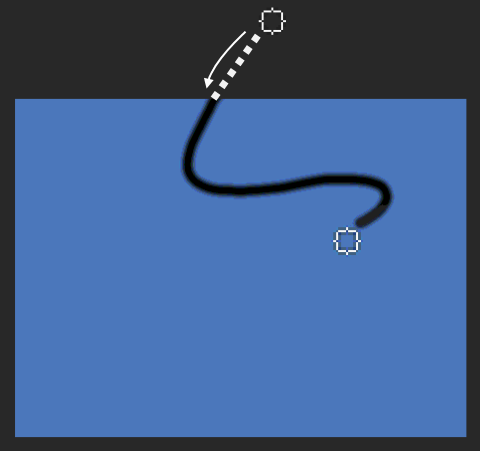
 tool is selected in the Floating Tools toolbar. As a workaround, start using the tool outside the canvas, and then work your way onto the canvas. The drawing tool starts working after you drag it inside the canvas.