Setting and removing the upper and lower limit
After calibrating the stand, you can set the upper and lower limits.
Note
Recalibrating the stand will remove any limits you've set, and you will have to set them again.
To set the upper limit
Turn the control switch's key clockwise and hold it there until the stand reaches its highest position.
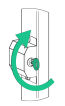
Continue to hold the key in the clockwise position for 10 seconds until you hear one beep.
Continue to hold the key in the clockwise position for 5 seconds until you hear two beeps. Now you can set the upper limit.
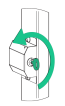
Turn the key counter-clockwise and lower the stand until the desired height is reached.
Release the key. After 5 seconds, a beep will indicate success.
To set the lower limit
Turn the control switch's key clockwise and hold it there until the stand reaches its highest position.
Continue to hold the key for 10 seconds until you hear one beep. Now you can set the lower limit.
Turn the key counter-clockwise and lower the stand until the desired height is reached.
Release the key. After 5 seconds, a beep will indicate success.
To remove upper and lower limits
Turn the control switch's key clockwise and hold it there until the stand reaches its highest position.
Continue to hold the key in the clockwise position for 10 seconds until you hear one beep.
Continue to hold the key in the clockwise position for 5 seconds until you hear two beeps.
Continue to hold the key in the clockwise position for 5 seconds until you hear three beeps. All previously set limits have been removed.