Using the front control panel
The front control panel contains buttons for turning the display on and off, controlling the volume, freezing and unfreezing the screen, and going to the Home screen.
The front control panel also includes a light that indicates the display’s current power state.
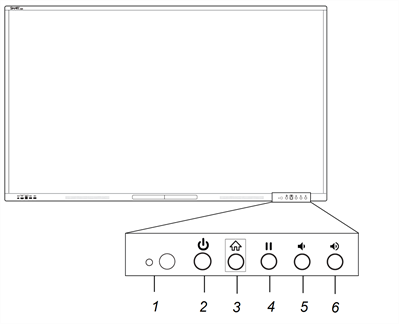
No. | Name | Procedure |
|---|---|---|
1 | Remote control receiver and ambient light sensor |
|
2 |
| |
3 | Home |
|
4 | Freeze |
|
5 | Volume decrease |
|
6 | Volume increase |
|
The Power button’s color indicates the display’s status:
Power button | Display status |
|---|---|
Off | Not receiving power |
Red (solid) | Standby mode |
Red/blue (blinking, slow) | Ready mode |
Blue | Normal operating mode |
Red/blue (flashing, rapid) | Background process running (for example, the display is turning off) |