Connecting to a network
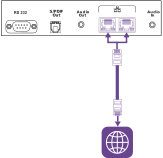
The display requires a network and internet connection for downloading software and firmware updates. You can connect to a network using Wi‑Fi or one of the RJ45 Ethernet jacks.
Important
Additional network configuration is required to enable users to share their devices’ screens when using the display’s SMART Mirror app.
Note
The display’s network connection is shared internally with an OPS PC.
Tip
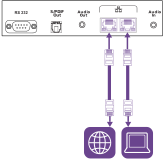
If you’re using one of the display’s RJ45 jacks to connect to an Ethernet network, you can connect the other jack to a computer to provide network access for the computer. This is particularly useful if there is only one wired network connection in the room. (Network access is available when the display is on, but not when it’s in Standby mode).