Managing the display using RS‑232
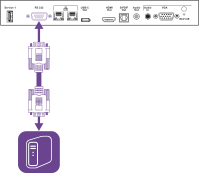
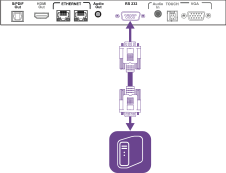
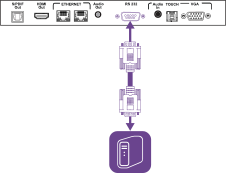
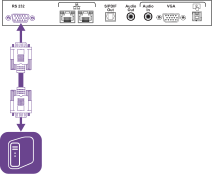
You can connect an RS-232 cable from a computer or a control system’s serial output to the display’s RS-232 In connector to remotely select video inputs, turn the display on or off, and get information about the display’s current settings, such as volume and power state.
Important
Use only a standard RS-232 cable. Do not use a null modem cable. Null modem cables typically have ends of the same type.
 Configuring the serial interface settings
Configure the computer or control system’s serial interface before sending commands to the display.
Turn on the display.
If you’re using a terminal application on a computer, activate local echo to see what you’re typing and sending to the display.
Configure the serial interface settings with the following values:
Baud rate
19200
Data length
8
Parity bit
None
Stop bit
1
Send a carriage return character (<CR>) to the display. The display will show a command prompt (>) to indicate that the display can now accept commands.
Note
If you’re using a terminal application on a computer, pressing ENTER should send a carriage return character (<CR>) but may also send a line feed character (<LF>), depending on your terminal application configuration.
If no message appears or an error message appears, the serial interface isn’t configured correctly. Repeat steps 3 and 4.
When you use a control system program instead of terminal program, all lines output from the display are preceded by a carriage return character (<CR>) and line feed character (<LF>) and then followed by a carriage return character (<CR>) and line feed character (<LF>), as shown in the example below.
>set volume=0<CR>
<CR><LF>
volume=0<CR><LF>
>
See alsowikipedia.org/wiki/ASCII
Commands and responsesTo access display information or to adjust display settings using the room control system, send a command after the command prompt (>), send a carriage return character or press ENTER, and then wait for the response from the display. Responses are preceded by a carriage return character (<CR>) and line feed character (<LF>) and then followed by a carriage return character (<CR>) and line feed character (<LF>). If no command prompt is present, send a carriage return character to the display. If the display is ready to receive commands, it will show a command prompt (>) when the carriage return is received. See the example below.
In this example, the user used =-50 instead of -50.
Notes
Use ASCII formatted commands.
Commands aren’t case-sensitive and extra spacing is ignored.
In many terminal applications on a computer, you can use the BACKSPACE key when typing commands.
Review each entry carefully before sending a command to the display.
Don’t send another command until you receive the response and the next command prompt (>). If no command prompt is present, send a carriage return character (<CR>) to the display. If the display is ready to receive commands, it will show a command prompt after receiving the carriage return.
To retrieve a setting’s current value
Use a
getcommand.This example shows how to get the volume:
Copy>get volume
volume=55
>
To assign a value to a setting
Use a
setcommand.This example sets the volume to 65:
Copy>set volume=65
volume=65
>
To increase or decrease the value of a setting
Use the
setcommand to increase or decrease the value by a designated number.This example increases the volume by 5:
Copy>set volume+5
volume=70
>This example decreases the volume by 15:
Copy>set volume-15
volume=55
>
To view information on all available commands 1
Use the
helpcommand.Copy>help
Power state commandsGet command | Set command | Response |
|---|---|---|
|
Where Value is one of the following:
Notes
|
Where Value is one of the following:
|
Note
When the display’s power state is in standby, issuing any command via RS-232 will automatically wake the display and change the display’s power state to on.
See alsoEnergy saving modes
Input commandsGet command | Set command | Response |
|---|---|---|
|
Where Value is one of the following:
Note The usbc1 set command applies only to displays equipped with USB Type-C receptacles. |
Where Value is one of the following:
|
Brightness commandsGet command | Set command | Response |
|---|---|---|
|
Where Value is one of the following:
|
Where Value is a number between 0 and 100 Where Value is a number between 5 and 100 |
Freeze commandsGet command | Set command | Response |
|---|---|---|
|
Where Value is one of the following:
|
Where Value is one of the following:
|
Screen shade commandsGet command | Set command | Response |
|---|---|---|
|
Where Value is one of the following:
|
Where Value is one of the following:
|
Speaker commandsGet command | Set command | Response |
|---|---|---|
|
Where Value is one of the following:
|
Where Value is a number between 0 and 100 |
|
Where Value is one of the following:
|
Where Value is one of the following:
|
Microphone array commandsGet command | Set command | Response |
|---|---|---|
|
Where Value is one of the following:
|
Where Value is one of the following:
|
Firmware version commandsGet command | Response |
|---|---|
|
Where Value is the firmware version. |
Model number commandsGet command | Response |
|---|---|
|
Where Value is one of the following:
|
Serial number commandsGet command | Response |
|---|---|
|
Where Value is the serial number. |
Part number commandsGet command | Response |
|---|---|
|
Where Value is the part number, including the revision. |
Asynchronous messagesThe display sends an asynchronous message when the front control panel, Settings app, or remote control are used to change a display’s setting that can be controlled by RS-232. The display will also send an asynchronous message if the display’s power state changes. Asynchronous messages are identified by a pound sign (#) before the message and aren’t followed by a command prompt (>).
Change | Asyncronous message |
|---|---|
Display power state |
Where Value is one of the following:
|
Input selection |
Where Value is one of the following:
|
Brightness |
Where Value is a number between 5 and 100 Where Value is a number between 0 and 100 |
Freeze frame |
Where Value is one of the following:
|
Screen shade |
Where Value is one of the following:
|
Volume increase or decrease |
Where Value is a number between 0 and 100 |
Volume mute |
Where Value is one of the following:
|
You can connect a control system or terminal emulation program on your computer to the display's room control input and remotely select video inputs, change power and sleep states, and get information about the display’s current settings, such as current input source, contrast, and power state.
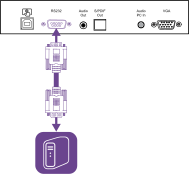
Connect an RS-232 cable from the control system or the computer’s serial port to the RS‑232 In connector on the bottom of the display.
Important
Use only a standard RS-232 cable. Do not use a null modem cable. Null modem cables typically have ends of the same type.
Configuring the serial interface settingsConfigure the control system or computer’s serial interface before sending commands to the display.
To configure the serial interface settings
Turn on the display.
Turn on the control system or computer, and access the serial data communications settings.
If you’re using a terminal emulation program on a computer, activate local echo.
Configure the serial interface settings using the following values, and then press ENTER.
Baud rate
19200
Data length
8
Parity bit
None
Stop bit
1
When a command prompt (>) is received by your control system or terminal emulation program, the display can accept commands. If the command prompt isn’t received, send a carriage return character (0x0d) to the display (press ENTER on your keyboard if you’re using a terminal emulation program on your computer).
Note
If no message or an error message is received in the control system or terminal emulation program, the serial interface isn’t configured correctly. Repeat steps 3 and 4.
Communication structureCommunication consists of a command argument, the property affected, an operator symbol, a value to apply, and a terminating carriage return character (0x0d).
Important
When manually entering commands into a terminal emulation program, commands must be terminated with only a carriage return character (0x0d). If you terminate a command with both a carriage return character (0x0d) and a line feed (0x0a), the command may not be processed, and the command prompt that indicates readiness to receive the next command may not be received.
Notes
The display won’t respond to RS-232 commands when it is in a low power state (soft off). Disable Power saving mode to prevent the display from entering a low power state.
When you first turn on the display, the RS-232 connector operates in a special diagnostics mode instead of control mode, and the display won’t respond to control commands. In addition, the connected control system or terminal emulation program might receive unexpected data characters.
Program a connected control system to ignore the unexpected data characters and only send commands after it receives the command prompt (>).
If you haven’t disabled Power saving mode, you’ll see the unexpected characters every time you turn on the display.
To use the room control system to get information about the display or to adjust display settings, send commands after receiving a command prompt (>), and then wait for the display’s response before sending another command.
If you send a command that the room control system doesn’t recognize, you receive an invalid command response.
This example contains an extra space in the volume command.
Notes
Use ASCII formatted commands.
Commands aren’t case-sensitive.
When manually entering commands into a terminal emulation program, review each entry carefully before you press ENTER to send a carriage return (0x0d) to terminate the command.
Don’t send another command until you receive the response and the next command prompt.
To identify the current value of a setting
Use a
getcommand.This example shows how to get the display’s current volume setting:
Copy>get volume
volume=55
>
To assign a value to a setting
Use a
setcommand.This example sets the volume to 65:
Copy>set volume=65
volume=65
>
CommandsGet command | Set command | Response |
|---|---|---|
|
Where Value is one of the following:
Notes
See alsoEnergy saving modes |
Where Value is one of the following:
|
|
Where Value is one of the following:
|
Where Value is one of the following:
Notes
|
|
Where Value is one of the following:
|
Where Value is a number between 5 and 100 Note Enabling Auto Brightness overrides any brightness values set manually. |
|
Where Value is one of the following:
|
Where Value is a number between 0 and 100 |
|
Where Value is one of the following:
|
Where Value is one of the following:
|
| N/A |
Where Value is the firmware version. |
| N/A |
Where Value is the display’s serial number. Note If multiple displays are connected, the response includes the serial numbers for all displays, separated by commas. |
| N/A |
Where Value is the part number, including the revision. |
Note This command is only available in SMART Board MX firmware 1.8.7 or later. |
Where Value is one of the following:
Note This command is only available in SMART Board MX firmware 1.8.7 or later. |
Where Value is one of the following:
Note This command is only available in SMART Board MX firmware 1.8.7 or later. |
- SMART Board MX (V5) and MX (V5) Pro series installation and maintenance guide – 171897
- SMART Board MX (V4) and MX (V4) Pro series installation and maintenance guide – 171870
- SMART Board MX (V3) and MX (V3) Pro series installation and maintenance guide – 171895
- SMART Board MX (V2 and V2-C) and MX (V2 and V2-C) Pro series installation and maintenance guide – 171555
- SMART Board MX and MX Pro series installation and maintenance guide – 171257