Remotely managing your board
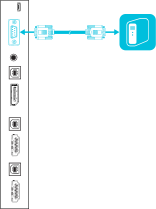
You can connect an RS-232 cable from the computer’s serial output to the RS‑232 input on the connector panel to remotely select video inputs, turn the board on or off and get information about the board’s current settings, such as contrast and power state.
Important
Use only a standard RS-232 cable. Do not use a null modem cable. Null modem cables typically have ends of the same type.
Note
You can remotely manage only the board and not the SMART kapp iQ appliance.
 Configuring the computer’s serial interface settings
Configure the computer’s serial interface before sending commands to the board.
To configure the computer’s serial interface
Turn on the board.
Turn on the computer, and then start the serial communications program or terminal emulation program.
Activate local echo.
Configure the serial interface settings using the following values, and then press ENTER.
Baud rate
19200
Data length
8
Parity bit
None
Stop bit
1
A command prompt (>) appears on the following line, and the board can now accept commands from the computer.
Note
If no message appears or an error message appears, the serial interface isn’t configured correctly. Repeat steps 3 and 4.
Power modesThe board has three power modes:
On
Power Save
Standby
All commands are available when the board is on. Some commands are available when the board is in Standby mode.
Commands and responsesTo access board information or to adjust board settings using the room control system, type commands after the command prompt (>), and then wait for the response from the board.
If you type a command that the room control system doesn’t recognize, you will receive an invalid command response.
In the example below, the user included an extra space in the contrast command.
Notes
Use ASCII formatted commands.
Commands aren’t case-sensitive.
Review each entry carefully before you press ENTER.
Don’t send another command until you receive the response and the next command prompt.
To view a list of available commands
Type ? at the command prompt, and then press ENTER.
To identify the current value of a setting
Use the get command.
This example shows how to get the contrast level:
Copy>get contrast
contrast=55
To assign a value to a setting
Use the set command.
This example sets the contrast level to 65:
Copy>set contrast=65
contrast=65
SMART kapp iQ 65‑V2 and SMART kapp iQ 75 command inventoryPower stateUse the following commands to identify power state settings.
Command | Response | Possible values | Standby mode |
|---|---|---|---|
|
|
| Yes |
|
|
| Yes |
Use the following commands to assign power state settings.
Command | Possible values | Response | Standby mode |
|---|---|---|---|
|
|
| Yes |
SourceUse the following commands to identify source settings.
Command | Response | Possible values | Standby mode |
|---|---|---|---|
|
|
| Yes |
|
|
| Yes |
|
|
| No |
Use the following commands to assign source settings.
Command | Possible values | Response | Standby mode |
|---|---|---|---|
|
|
| Yes |
|
|
| No |
VideoUse the following commands to identify video settings.
Command | Response | Possible values | Standby mode |
|---|---|---|---|
|
|
| No |
|
|
| No |
|
|
| No |
|
|
| No |
|
|
| No |
|
|
| No |
|
|
| No |
|
|
| No |
|
|
| No |
Use the following commands to assign video settings.
Command | Possible values | Response | Standby mode |
|---|---|---|---|
|
|
| No |
|
|
| No |
|
|
| No |
|
|
| No |
|
|
| No |
|
|
| No |
|
|
| No |
|
|
| No |
|
|
| No |
AudioUse the following commands to identify audio settings.
Command | Response | Possible values | Standby mode |
|---|---|---|---|
|
|
| No |
|
|
| No |
|
|
| No |
Use the following commands to assign audio settings.
Command | Possible values | Response | Standby mode |
|---|---|---|---|
|
|
| No |
|
|
| No |
|
|
| No |
|
|
| No |
Multi-WindowUse the following commands to identify Multi-Window settings.
Command | Response | Possible values | Standby mode |
|---|---|---|---|
|
|
| No |
|
|
| No |
|
|
| No |
|
|
| No |
|
|
| No |
|
|
| No |
Use the following commands to assign Multi-Window settings.
Command | Possible values | Response | Standby mode |
|---|---|---|---|
|
|
| No |
|
|
| No |
|
|
| No |
|
|
| No |
|
|
| No |
|
|
| No |
System informationUse the following commands to identify system information settings.
Command | Response | Possible values | Standby mode |
|---|---|---|---|
|
|
| No |
|
| Scalar version firmware number | Yes |
|
| Touch controller firmware version number | Yes |
|
| Touch controller serial number | No |
|
|
| No |
|
|
| No |
|
|
| No |
|
| Model number | No |
|
| Serial number | No |
|
|
|
|
|
|
| Yes |
|
|
| Yes |
|
|
| No |
|
|
| No |
|
|
| No |
|
|
| No |
Use the following commands to assign system information settings.
Command | Possible values | Response | Standby mode |
|---|---|---|---|
|
|
| No |
|
|
| Yes |
|
|
| No |
|
|
| Yes |
|
|
| Yes |
|
|
| No |
|
|
| No |
|
|
| No |
|
|
| No |
SMART kapp iQ 55 and SMART kapp iQ 65 command inventoryPower stateUse the following commands to identify power state settings.
Command | Response | Possible values | Standby mode |
|---|---|---|---|
|
|
| Yes |
|
|
| Yes |
Use the following commands to assign power state settings.
Command | Possible values | Response | Standby mode |
|---|---|---|---|
|
|
| Yes |
SourceUse the following commands to identify source settings.
Command | Response | Possible values | Standby mode |
|---|---|---|---|
|
|
| Yes |
|
|
| Yes |
Use the following commands to assign source settings.
Command | Possible values | Response | Standby mode |
|---|---|---|---|
|
|
| Yes |
VideoUse the following commands to identify video settings.
Command | Response | Possible values | Standby mode |
|---|---|---|---|
|
|
| No |
|
|
| No |
|
|
| No |
|
|
| No |
|
|
| No |
|
|
| No |
|
|
| No |
|
|
| No |
|
|
| No |
|
|
| No |
Use the following commands to assign video settings.
Command | Possible values | Response | Standby mode |
|---|---|---|---|
|
|
| No |
|
|
| No |
|
|
| No |
|
|
| No |
|
|
| No |
|
|
| No |
|
|
| No |
|
|
| No |
|
|
| No |
|
|
| No |
|
|
| No |
AudioUse the following commands to identify audio settings.
Command | Response | Possible values | Standby mode |
|---|---|---|---|
|
|
| No |
|
|
| No |
|
|
| No |
|
|
| No |
|
|
| No |
|
|
| No |
|
|
| No |
|
|
| No |
|
|
| No |
|
|
| No |
|
|
| No |
Use the following commands to assign audio settings.
Command | Possible values | Response | Standby mode |
|---|---|---|---|
|
|
| No |
|
|
| No |
|
|
| No |
|
|
| No |
|
|
| No |
|
|
| No |
|
|
| No |
|
|
| No |
|
|
| No |
|
|
| No |
|
|
| No |
|
|
| No |
System informationUse the following commands to identify system information settings.
Command | Response | Possible values | Standby mode |
|---|---|---|---|
|
|
| No |
|
| Scalar version firmware number | Yes |
|
| Touch controller firmware version number | Yes |
|
| Touch controller serial number | No |
|
|
| No |
|
|
| No |
|
| Model number | No |
|
| Serial number | No |
|
|
|
|
|
|
| Yes |
|
|
| Yes |
|
|
| No |
|
|
| No |
Use the following commands to assign system information settings.
Command | Possible values | Response | Standby mode |
|---|---|---|---|
|
|
| No |
|
|
| Yes |
|
|
| No |
|
|
| Yes |
|
|
| Yes |
|
|
| No |
|
|
| No |
|
|
| No |