Charging the multistylus
The SMART MultiStylus charges wirelessly when placed in the docking station. It uses an internal ultra-capacitor instead of a traditional battery, so it charges quickly and requires no battery replacement or calibration. Return the multistylus to the docking station when you're not using it to keep it charged and ready.
Removing the multistylus from the docking station activates it.
Charging for the first time
Before using the multistylus for the first time, place it in the docking station and allow it to charge fully. Placing the multistylus in the docking station also pairs it with the display.
Charging times
A quick charge takes one minute and provides about 60 minutes of use.
A full charge typically completes within six minutes.
Note
The docking station's indicator light turns solid green when the multistylus is fully charged.
Charging best practices
Return the multistylus to the docking station when you're not using it. The multistylus doesn't have a low-charge indicator, so docking it regularly ensures it's always ready to use.
Use only the docking station included with the multistylus to charge it.
Make sure the multistylus is correctly seated in the docking station. The multistylus LED turns on to confirm it's charging.
Status indicator light
The multistylus LEDs will turn on to indicate the multistylus’s status:
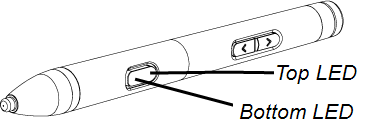
LED color | Action | Status |
|---|---|---|
LED changes from partially to fully lit when connected to the docking station. | Stylus is connected and charging. | |
| Color fades in and out once when the multistylus is removed from the docking station. | Stylus has been removed from the docking station and is active. | |
The top and bottom LEDs flash and alternate when the multistylus is connected to the docking station. | The multistylus firmware is updating while in the docking station. | |
The top LED blinks once when the multistylus is connected to the docking station. | Full charge. | |
Both LEDs fade in and out once when the LED button is pressed once. | Shows the current selected ink color. | |
The bottom LED blinks three times. | Low charge. | |
Both LEDs flash on and off at the same time. | The multistylus is disconnected from the display. |