Using the receiver
The receiver for the SMART SoundLift voice amplification solution receives an audio signal and transmits it to the display’s speakers. Pairing and connecting a microphone with the receiver is easy, and the receiver doesn’t allow unpaired microphone audio to bleed into the speaker system. The status of the LED on a microphone makes it easy to tell at a glance if a microphone is properly connected.
SMART SoundLift supports the simultaneous pairing and connection of up to two microphones to the system’s receiver.
 About the receiver
The receiver has the following features.
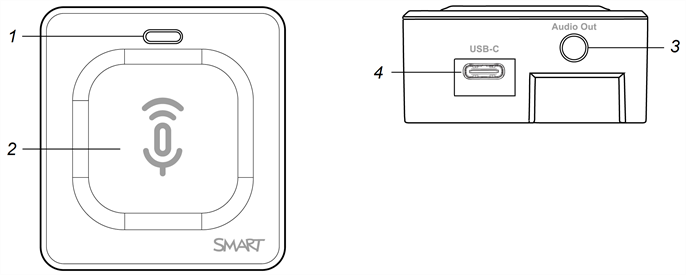
No. | Function | Description |
|---|---|---|
1 | LED | The LED indicates the pairing and connection status of the receiver with a microphone. |
2 | Touch pairing area | Hold the microphone against the pairing area on the receiver until a beep is heard from the receiver. |
3 | 3.5 mm audio output connector | Connects to the display using a stereo 3.5 mm cable. See the SMART SoundLift textless installation instructions (docs.smarttech.com/kb/172101) |
4 | Power | 5 V USB Type-C power supply (connects to the display using the included USB Type-A to USB Type-C receiver power cable). See the SMART SoundLift textless installation instructions (docs.smarttech.com/kb/172101) |
About the receiver’s LEDThe receiver’s LED provides status and troubleshooting information for the receiver.
LED status | Microphone status | Notes |
|---|---|---|
No light | Receiver is not connected to power. | N/A |
Flashing green | Not connected with a microphone. | The receiver will enter standby mode after 3 seconds of not being connected to a microphone. |
Flashing green rapidly | Pairing with a microphone. | If pairing with a microphone fails, the receiver will enter standby mode 1 minute after failing to pair. |
Solid green | Paired with a microphone. | N/A |
Solid orange | Standby mode. | The receiver is waiting to connect with a microphone. |