Pairing the microphones
A SMART SoundLift microphone must be paired to a receiver before it can connect to the receiver and work.
Note
The SMART SoundLift system comes with the microphones and receiver already paired and ready to connect.
A microphone’s LED flashes while it automatically connects to a receiver and then displays a solid color when connected. If a microphone’s LED continues flashing until the microphone turns off without connecting to a receiver, use the following instructions to pair the microphone to a receiver.
To pair a microphone
If the microphone is turned off, turn it on by pressing and holding the Power button
 for at least two seconds.
The microphone also turns on when its removed from the charging case.
Quickly press the microphone’s Power button
twice.The LED on the microphone flashes rapidly.
Hold the microphone against the pairing area on the receiver until a beep is heard from the receiver.
The LED on the microphone displays a solid color and the receiver’s LED lights green to indicate successful pairing.
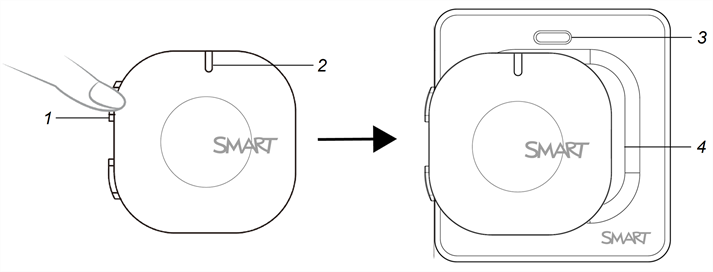
No.
Function
1
Power/Mute/Pairing button
2
Microphone status LED
3
Receiver status LED
4
Receiver touch pairing area