Installing SMART SoundLift
Important
Use only the cables included with the SMART SoundLift voice amplification solution, or cables recommended by SMART, when installing and using SMART SoundLift. The use of non‑recommended cables may result in reduced functionality or unexpected behavior.
The following cables are included with the SMART SoundLift system.
Part number | Description |
|---|---|
1044756 | Assembly, Cable, Audio, 3.5 mm TRS to 3.5 mm TRS, 0.5 m (1.64 ft) |
1044758 | Assembly, Cable, USB Type C to USB Type A, 0.5 m (1.64 ft) |
1044933 | Assembly, Cable, USB Type C to USB Type C, 0.5 m (1.64 ft) |
You or your organization’s installers can install SMART SoundLift on a supported SMART Board interactive display by following the illustrated installation instructions included with the product. If you’ve misplaced these instructions, they’re also available online.
 Installation considerations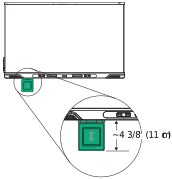
The SMART SoundLift receiver's mounting bracket attaches magnetically to the display's frame. Position it so the included cables can reach from the receiver to the appropriate connectors on the rear connector panel (see the illustrated installation instructions included in the box).
Make sure there's enough space around the display to accommodate the receiver.
System requirementsThe SMART SoundLift system is compatible only with supported SMART Board interactive displays running iQ 4.7.2 or later.
Important
For instructions on updating your display's iQ software, refer to the product card included with the SMART SoundLift system.