Using the transmitter
The transmitter for the SMART SoundFlow audio broadcasting system provides a direct to device audio broadcast signal for discreet transmission to Auracast compatible personal listening devices.
SMART SoundFlow supports the connection of an unlimited number of devices to the system’s transmitter.
 About the transmitter
The transmitter has the following features.
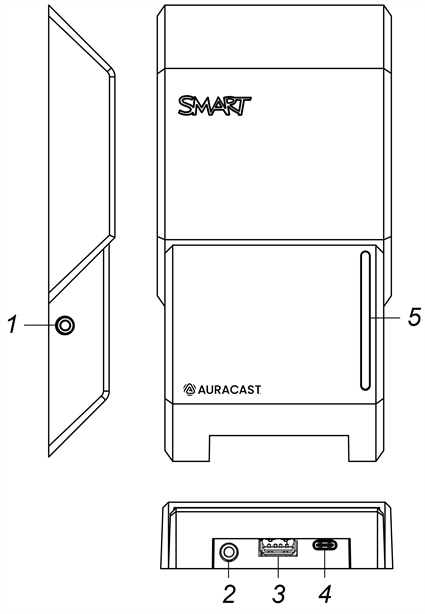
No. | Function | Description |
|---|---|---|
1 | 3.5 mm audio output connector | Connects an external audio system using a 3.5 mm audio cable. |
2 | 3.5 mm audio input connector | Connects to the display using a stereo 3.5 mm cable. See the SMART SoundFlow textless installation instructions (docs.smarttech.com/kb/172122). |
3 | USB Type-A | This connector is optional. Use it as a passthrough to the display's service port, or to supply power to a SMART SoundLift receiver. |
4 | Power | 5 V USB Type-C power supply (connects to the display using the included USB Type-A to USB Type-C transmitter power cable). See the SMART SoundFlow textless installation instructions (docs.smarttech.com/kb/172122). |
5 | LEDs | The LEDs indicate the status of the transmitter. |
About the transmitter’s LEDsThe transmitter’s LEDs provide status and troubleshooting information for the transmitter.
LED status | Transmitter status |
|---|---|
All LEDs pulsing purple | Broadcasting an Auracast signal. |
All LEDs are solid yellow | Firmware is updating. Note The transmitter goes offline while its firmware updates. |
All LEDs are solid green | Powered on, but not broadcasting an Auracast signal. |