Connectors
 PCM13 series
The following diagram and table present the connectors on the PCM13 series of SMART OPS PC modules:
No. | Connector | Connects to | Notes |
|---|---|---|---|
1 | Stereo 3.5 mm | Headphones or headsets | N/A |
2 | HDMI out | External display | |
3 | USB Type-C | Supported USB drives, peripherals, and other devices | |
4 | USB 3.2 Gen 1 Type-A | Supported USB drives, peripherals, and other devices | |
5 | RJ45 | N/A | The OPS PC module uses the SMART Board interactive display’s network connection (if available), so you typically don’t need to connect the OPS PC module directly to a network. |
PCM12-i5 seriesThe following diagram and table present the connectors on the PCM12-i5 series of SMART OPS PC modules:
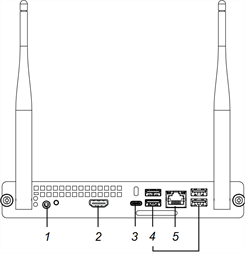
No. | Connector | Connects to | Notes |
|---|---|---|---|
1 | Stereo 3.5 mm | Headphones or headsets | N/A |
2 | HDMI out | External display | |
3 | USB Type-C | Supported USB drives, peripherals, and other devices | |
4 | USB 3.2 Gen 1 Type-A | Supported USB drives, peripherals, and other devices | |
5 | RJ45 | N/A | The OPS PC module uses the SMART Board interactive display’s network connection (if available), so you typically don’t need to connect the OPS PC module directly to a network. |
Note
Charge up to five devices at a time using USB receptacles.
PCM11 seriesThe following diagram and table present the connectors on the PCM11 series of SMART OPS PC modules:
No. | Connector | Connects to | Notes |
|---|---|---|---|
1 | Stereo 3.5 mm | Headphones or headsets | N/A |
2 | HDMI out | External display | |
3 | USB Type-C | Supported USB drives, peripherals, and other devices | |
4 | USB 3.2 Gen 1 Type-A | Supported USB drives, peripherals, and other devices | |
5 | RJ45 | N/A | The OPS PC module uses the SMART Board interactive display’s network connection (if available), so you typically don’t need to connect the OPS PC module directly to a network. |
Note
Charge up to five devices at a time using USB receptacles.
PCM8 seriesThe following diagram and table present the connectors on the PCM8 series of SMART OPS PC modules:
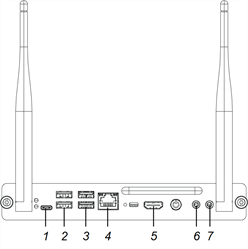
No. | Connector | Connects to | Notes |
|---|---|---|---|
1 | USB Type-C | Supported USB drives, peripherals, and other devices | |
2 | USB 2.0 Type-A (×2) | Supported USB drives, peripherals, and other devices | |
3 | USB 3.2 Gen 1 Type-A (×2) | Supported USB drives, peripherals, and other devices | |
4 | RJ45 | N/A | The OPS PC module uses the SMART Board interactive display’s network connection (if available), so you typically don’t need to connect the OPS PC module directly to a network. |
5 | HDMI out | External display | |
6 | Stereo 3.5 mm out | External speakers or headphones | N/A |
7 | Stereo 3.5 mm in | Microphone | N/A |
Note
Charge a maximum of two devices at a time using USB receptacles. The USB Type-C connector provides up to 1.5 A for charging.